Wiley Figure Requirements
What Wiley Author Services says about figure resolution, preferred file types, canvas size and file size, with sources, and a checker that tests your figure file at the width you choose.
Recent
Your last 10 settings, saved only in this browser. Nothing is uploaded.
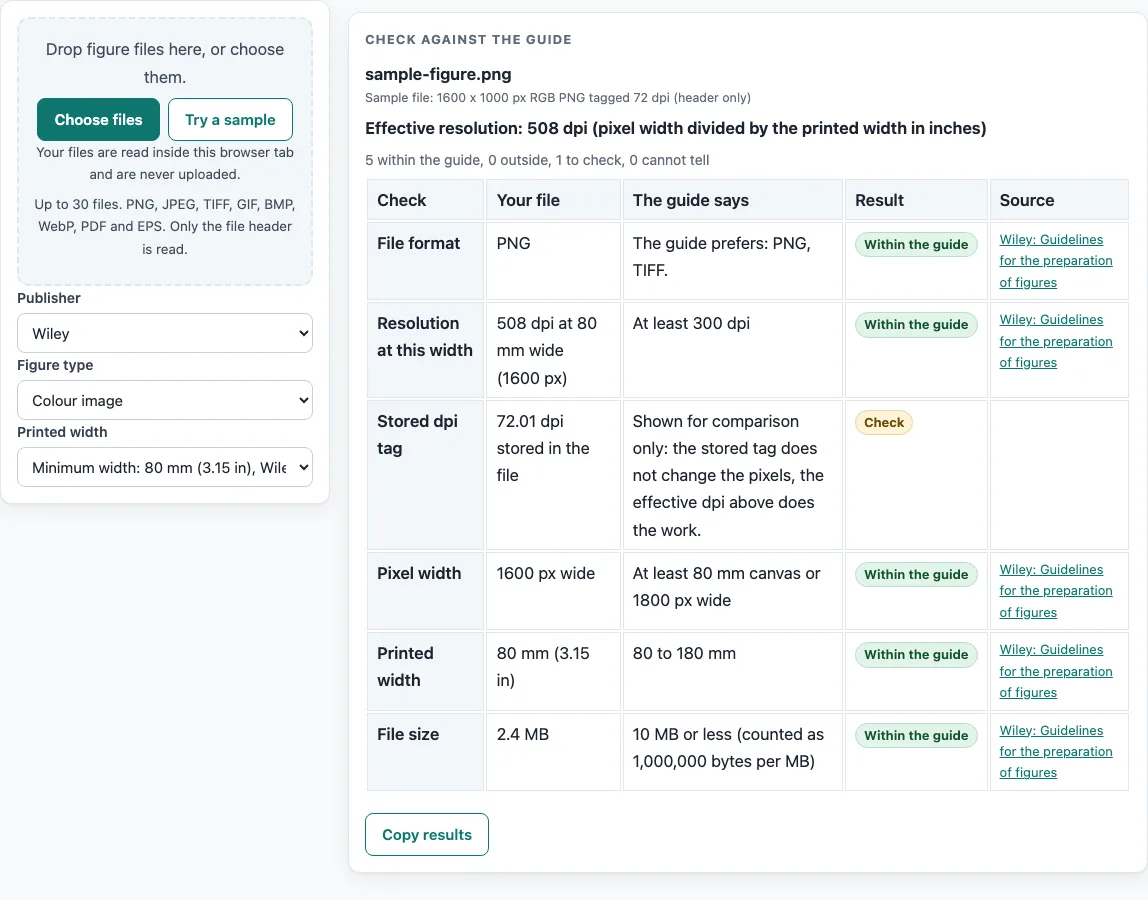
How to use the Wiley figure requirements checker
- Choose Wiley as the publisher, then pick your figure type: Line art (black and white), Grayscale image, Colour image, or Combination (image and line art).
- Pick the printed width. The list offers Minimum width (80 mm, 3.15 in) and Maximum width (180 mm, 7.09 in). You can also type your own.
- Drop your figure file on the checker. The file is read in the browser and not uploaded.
- Read the resolution row. The tool divides your pixel width by the printed width. Line art and combination figures should have at least 600 dpi, and grayscale and colour images at least 300 dpi. These are the preferred values for submission.
- Read the file format row. Line art and combination figures prefer PDF. Grayscale and colour images prefer PNG or TIFF.
- Read the width rows. The checklist gives 80 mm to 180 mm, and the table asks for a canvas of at least 80 mm or 1800 px wide.
- Read the file size row. Each figure should be 10 MB or less, where 1 MB counts as 1,000,000 bytes.
- Read the notes. The complete zipped package of article files should be under 500 MB, and photographs should have a final resolution of at least 300 dpi.
- Before you submit, compare these values with the journal’s current author guide, because publisher specifications change.
Where a value on the page differs from another value on the same page, both are shown. Read each one against your figure before deciding which applies.
What are the Wiley figure requirements for resolution and format?
The Wiley figure guide sets preferred resolutions by figure type: at least 600 dpi for line art and combination figures, and at least 300 dpi for grayscale and colour images. It prefers PDF for line art and combination figures, and PNG or TIFF for grayscale and colour images.
Dpi means dots per inch. A higher dpi means more dots in each inch of the printed figure. The guide also says that at submission any standard file type is acceptable if it is legible. The dpi and format figures are the preferred ones, and when in doubt the guide suggests submitting a PDF.
How do the Wiley figure width, pixel and file size limits fit together?
The checklist asks for figures between 80 mm and 180 mm wide, and between 300 dpi and 600 dpi. The table asks for a canvas of at least 80 mm, or at least 1800 pixels wide, with no upper limit. Both statements are shown here because they do not match exactly.
You can convert between units with two facts. One inch is 25.4 mm, so 80 mm is 3.15 in and 180 mm is 7.09 in. Pixel width equals dpi multiplied by width in inches. For example, a figure 7.09 in wide at 300 dpi is about 2,126 pixels across. This is a calculation from the stated values, not a separate requirement.
File size is limited to 10 MB or less per figure, and the full zipped package should be under 500 MB. The guide does not state a colour mode, a font or font size, or a minimum line weight. For those details, use the journal’s current author guide.
Which Wiley rules are not covered here?
Only the Wiley Author Services guidelines for the preparation of figures were read. Individual Wiley journals may have their own instructions, and none were read. Requirements for production after a paper is accepted, beyond the table on that page, were not read either.
Because the page gives preferred values rather than strict limits, treat the numbers here as the starting point for your export. The journal’s current author guide decides what applies to your submission.
The numbers on this page were read from the guide on 2026-10-15. For example, a figure 180 mm wide at 600 dpi is about 4,252 pixels across, and you should compare the file size with the 10 MB limit before you submit. A smaller canvas of at least 80 mm is also within the table, so you can pick the width your layout needs.
Frequently asked questions
Which file formats do the Wiley figure requirements prefer?
The guide prefers PDF for line art and combination figures. It prefers PNG or TIFF for grayscale and colour images. At submission, any standard file type is acceptable if it is legible.
What dpi does the Wiley figure guide ask for?
Line art and combination figures should have at least 600 dpi. Grayscale and colour images should have at least 300 dpi. Photographs should have a final resolution of at least 300 dpi.
What width should a figure be under the Wiley figure requirements?
The checklist gives a range of 80 mm (3.15 in) to 180 mm (7.09 in). The table gives a minimum canvas of 80 mm or 1800 px wide, with no upper limit. Check the journal’s current author guide if the two differ for your figure.
What is the file size limit for Wiley figures?
Each figure should be 10 MB or less. The guide counts 1 MB as 1,000,000 bytes. The complete zipped package of article files should be under 500 MB.
Does the Wiley figure guide say which colour mode to use?
No. The page does not state a colour mode, a font or font size, or a minimum line weight. Look for these in the journal’s current author guide before you submit.
Why should I check the journal’s author guide if I already use this page?
Publisher specifications change, and a journal may set its own rules. This page shows what the named guide says and calculates values from your file. The journal’s current author guide is the source to confirm before submission.
Does the checker upload my figure?
No. Your file is read inside the browser and never uploaded. The checker is free and has no sign-up.
Related tools
- ACS Figure Requirements: use it when your target is an ACS journal and you want to compare its figure rules.
- Elsevier Figure Requirements: use it when you are preparing figures for an Elsevier journal.
- Embed Fonts in PDF Checker: use it to check the fonts inside a PDF figure, since this page does not state font rules.
- Journal Figure Size Calculator: use it to work out figure dimensions and pixel values from your own inputs.
- IEEE Figure Requirements: use it when your target is an IEEE publication.
- Journal Figure Checker: use it to check a figure against a set of journal values.
- PLOS Figure Requirements: use it when you are preparing figures for a PLOS journal.
- Springer Nature Figure Requirements: use it when your target is a Springer Nature journal.