Springer Nature Figure Requirements
Springer journal artwork pages and the Nature figure guides give different numbers; this page shows each one with its source, and a checker tests your file against all of them at the width you pick.
Recent
Your last 10 settings, saved only in this browser. Nothing is uploaded.
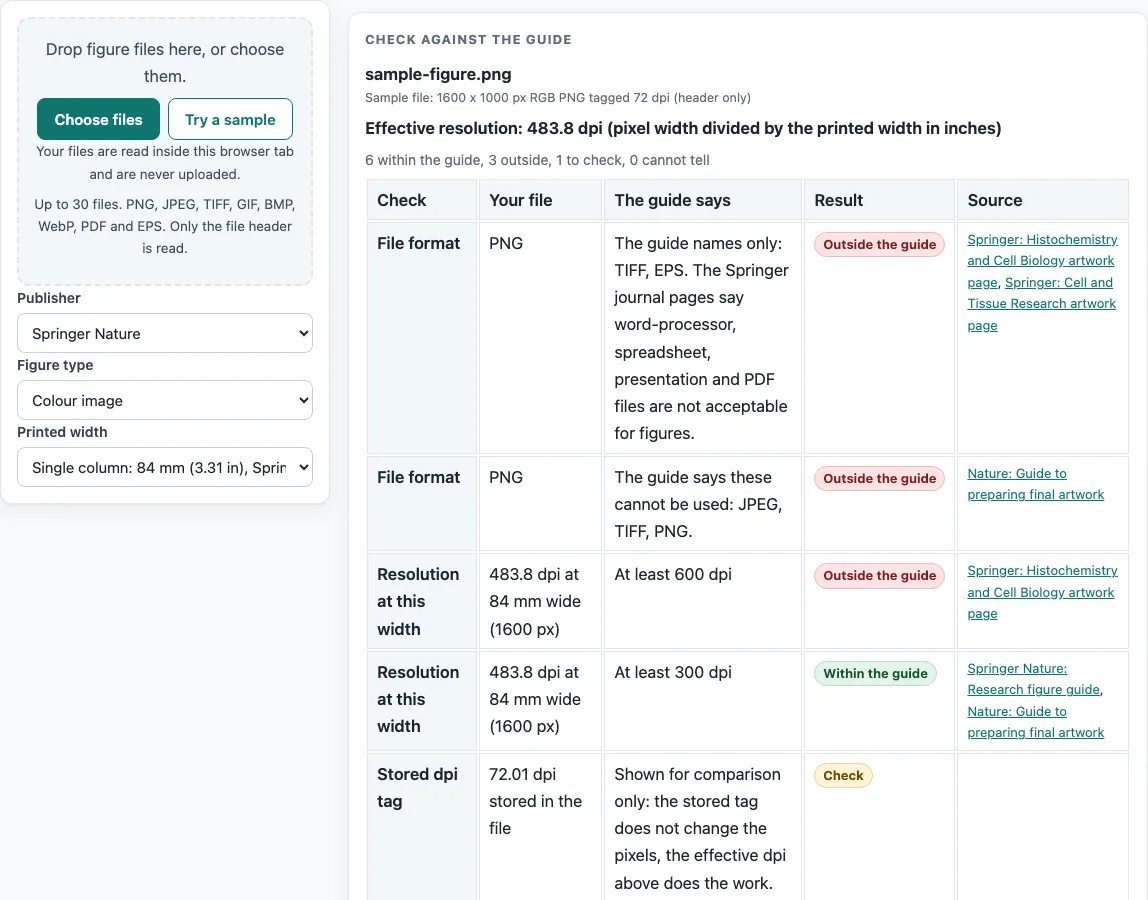
How to use the Springer Nature Figure Requirements checker
- Choose Springer Nature as the publisher, then pick the figure type: “Line art (black and white)”, “Grayscale image”, “Colour image”, or “Combination (image and line art)”. If your figure mixes photographs and line drawings, choose the combination type.
- Pick the printed width from the list: “Sub-column”, “Single column”, “1.5 columns”, “Double column” or “Full page width”. Each entry names its source, so you can see whether it comes from a journal page or from the Nature guide. You can also type your own width.
- Drop your figure file on the checker. The file is read in the browser and not uploaded.
- Read the resolution row. The tool divides your pixel width by the printed width to get the effective dpi, and shows it next to what the guide says.
- Read the file format, height and file size rows. The format rules of the journal pages and the Nature guide differ, so more than one row can appear.
- Read the notes under the table for lettering, line weight, font embedding and panels.
- Where the journal pages and the Nature guides differ, the tool shows each set separately. Read every row that applies to the journal you are submitting to.
Run the check again after any change to the figure type, width or file, since each change can alter the result. Before you submit, open the journal’s current author guide, because publisher specifications change.
What are the Springer Nature figure requirements for resolution, colour and line weight?
The journal pages list at least 1200 dpi for line art (black and white), at least 300 dpi for grayscale images, and at least 600 dpi for combination figures that mix image and line art. For colour images, the Histochemistry and Cell Biology page gives 600 dpi, while the research figure guide and the Nature guide give 300 dpi. The Nature guides give no line-art dpi at all.
For colour, the guide prefers RGB at 8 bits per channel. All lines should be at least 0.1 mm (0.3 pt) wide, so very fine strokes need to be thickened before you check the figure. Vector graphics that contain text must have their fonts embedded, and the research figure guide asks for TrueType 2 or 42 embedding.
Why do Springer Nature figure requirements differ between sources?
Springer Nature publications do not all use one set of figure rules, so the same figure can be checked against different numbers. The journal pages and the Nature guides disagree on line-art resolution (1200 dpi against no line-art figure), colour image resolution, and lettering. Journal pages give lettering of about 12 to 15 pt, while the Nature guides give a maximum text size of 7 pt and a minimum of 5 pt, with panel labels at 8 pt bold lowercase.
Widths and heights also differ. The journal pages list 39 mm for a sub-column, 84 mm for a single column, 129 mm for 1.5 columns and 174 mm for full page width, with a height of up to 234 mm. The Nature guides list 89 mm for a single column, 120 or 136 mm for 1.5 columns, and 183 mm for a double column, with a height of up to 247 mm.
The research figure guide disagrees with itself as well. It gives 300 dpi as the minimum for photographic images, but its export checklist gives a minimum of 450 dpi for images, and online proofs are capped at 450 dpi.
Which sources are used, and what do they not cover?
The numbers come from four pages read on the same day. Two are artwork pages of individual Springer journals, Histochemistry and Cell Biology and Cell and Tissue Research. The other two are the Springer Nature research figure guide and the Nature guide to preparing final artwork. The colour figure of 600 dpi appears on the Histochemistry and Cell Biology page only, and the 30 MB file limit appears on the Cell and Tissue Research page only.
Other Springer and Nature Portfolio journals were not read, and they may differ. The journal-specific numbers belong to those two journals and are not publisher-wide rules. The journal’s own current author guide decides which row applies to you.
Frequently asked questions
Which file formats do the Springer Nature figure requirements name?
The Histochemistry and Cell Biology and Cell and Tissue Research pages name TIFF and EPS. The Nature guide names EPS, PDF and PS, and says JPEG, TIFF and PNG cannot be used. The journal pages also list word-processor, spreadsheet, presentation and PDF files as not acceptable for figures.
What file size limit do the Springer Nature figure requirements give?
Only the Cell and Tissue Research page gives a file size limit, which is 30 MB or less. The tool counts 1 MB as 1,000,000 bytes. The other sources in this tool do not state a file size limit.
Do the Springer Nature figure requirements name a font?
The Histochemistry and Cell Biology page asks for lowercase Arial. The Cell and Tissue Research page asks for Arial or Helvetica. The Nature guide asks for sans-serif text, preferably Helvetica or Arial, and says not to rasterise text or convert it to outlines.
How should panels in a multi-part figure be arranged?
The journal pages say multi-part figures go in one file without border lines. Leave 1 mm of white space between parts.
Does this tool upload my figure files?
No. Files are read inside your browser and never uploaded. The tool is free and does not require a sign-up.
Why does the tool show more than one answer for the same figure?
The sources listed here do not agree on every figure rule. The tool shows each set of rules as a separate row, so you can see which guide each result comes from.
Are these rules the same for every Springer or Nature journal?
No. The journal numbers come from two Springer journal pages only, and other journals were not read. Use the journal’s own current author guide to decide.
Related tools
- ACS Figure Requirements: Use it when your figure is for a journal that follows ACS rules.
- Elsevier Figure Requirements: Use it when you are checking figures for an Elsevier journal.
- Embed Fonts in PDF Checker: Use it to check whether the fonts in a PDF are embedded.
- Journal Figure Size Calculator: Use it to work out the figure dimensions in millimetres or inches for a journal column width.
- IEEE Figure Requirements: Use it when your figure is for an IEEE publication.
- Journal Figure Checker: Use it to compare a figure’s settings against a journal’s listed figure rules.
- PLOS Figure Requirements: Use it when your figure is for a PLOS journal.
- Wiley Figure Requirements: Use it when you are checking figures for a Wiley journal.