Scientific poster size
Enter your poster and the board size from the call for posters; see whether it fits, turned or not, and how it compares with published event sizes.
Recent
Your last 10 settings, saved only in this browser. Nothing is uploaded.
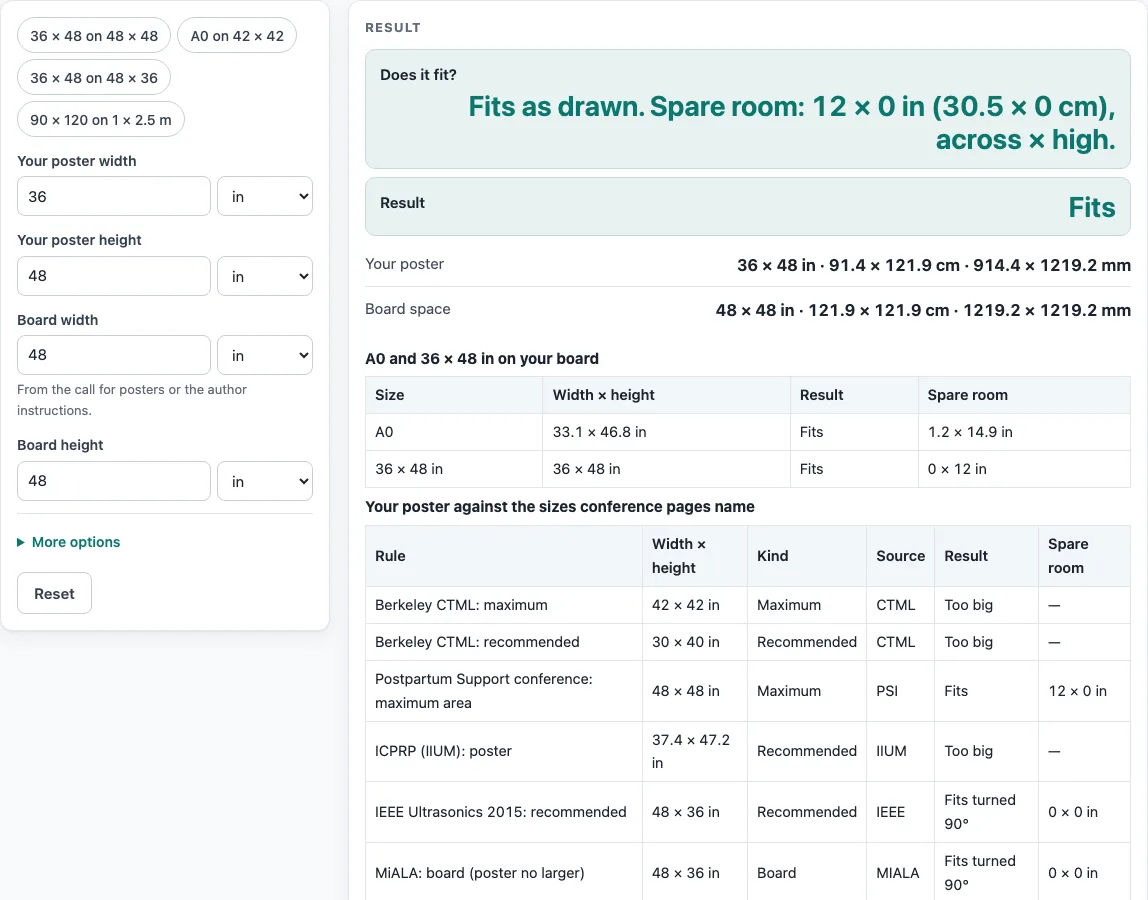
How to use the poster size checker
- Type your poster width and height. The defaults are 36 x 48 in.
- Type the board width and height. The default board is 48 x 48 in.
- Enter the free margin and choose its unit from inches, cm, mm, ft or m. The default margin is 0.
- Read the result. “Fits” means the poster fits as drawn. “Fits turned 90 degrees” means it fits when rotated. “Too big” means it does not fit in either direction.
- If the result says “Too big”, read the overshoot in the closest direction and the scale at which the poster would fit.
- Check the spare room, shown in inches and cm, to see how much space is left on the board.
- Open the rules table. It checks your poster against nine rules from public conference pages, with each source named.
- Read the second table, which shows A0 and 36 x 48 in on the board you typed. It turns the size to match a wide or square board.
- To start from a common case, use a preset: “36 x 48 on 48 x 48”, “A0 on 42 x 42”, “36 x 48 on 48 x 36”, or “90 x 120 on a 1 x 2.5 m board”.
The page gives warnings for a margin of 0 on a poster that fits, a poster bigger than the board, and a side over 200 in. It gives errors for a non-number, a size of zero or less, a negative margin, and a margin that leaves no room on the board. Read these messages before you rely on a result.
What is the standard scientific poster size?
There is no single standard. Conference pages publish different sizes, and the page lists them without averaging. Berkeley CTML recommends 30 x 40 in and allows up to 42 x 42 in, while a postpartum conference allows up to 4 x 4 ft. ICPRP lists 95 x 120 cm, and ISSBD recommends 90 x 150 cm.
How does the poster fit check work?
The poster fits when its width and height are no larger than the board minus twice the free margin. The check runs both as drawn and turned 90 degrees. Available width is board width minus 2 x margin, and available height is board height minus 2 x margin. For example, 36 x 48 in on a 48 x 48 in board with a margin of 0 fits as drawn, with spare room of 12 x 0 in (30.5 x 0 cm).
How is a poster scaled to fit a board?
When a poster is too big, the page finds the scale that would make it fit. The scale is the smaller of two values: space across divided by poster width, and space high divided by poster height. Take the better direction. For 36 x 48 in on a 42 x 42 in board, the poster is too big in both directions. Scaled to fit, it is 87.5 % of its size, or 31.5 x 42 in.
Why do scientific poster dimensions differ between events?
Each event sets its own limits. Berkeley CTML recommends 30 x 40 in but allows 42 x 42 in, the HFES board space is 42 x 42 in, and the postpartum page allows 48 x 48 in. The IEEE page and the MiALA board both describe landscape sizes of 36 high by 48 wide. The “36x48 poster” phrase is used for both 36 wide by 48 tall and 48 wide by 36 tall, so the page shows both orientations. ICPRP (95 x 120 cm, up to 150 cm high) and ISSBD (90 x 150 cm) are both portrait but differ, so both are listed side by side.
Is A0 the same as 36 x 48 in?
No. A0 measures 33.11 x 46.81 in. Compared with 36 x 48 in, the page shows A0 as 73.4 mm narrower and 30.2 mm shorter. Because the sizes differ, check which one the call for posters asks for before you choose a size.
Why does the HFES conversion show two values?
The HFES sheet gives 42 in as “106.68 cm” in one place and “160.68 cm” in another. The code uses 42 in only. When you need a metric figure from that source, check the event’s current guide, because the sheet’s two values do not agree.
Worked examples
| Input | Result |
|---|---|
| Poster 36 × 48 in on a 48 × 48 in board | Fits |
| Poster 48 × 36 in on a 48 × 36 in board | Fits |
| Poster 33.1 × 46.8 in on a 42 × 42 in board | Too big |
| Poster 35.4 × 47.2 in on a 39.4 × 98.4 in board | Fits |
Calculated by the tool above; open it with the same values to see each step.
Frequently asked questions
Frequently asked questions
Is there one scientific poster size that every event uses?
No. The sizes on conference pages differ, from 30 x 40 in recommended by Berkeley CTML to 90 x 150 cm recommended by ISSBD. The page lists them side by side without averaging.
What does “Fits turned 90 degrees” mean?
It means the poster fits the board only when rotated. Its width and height, swapped, are no larger than the board minus twice the margin.
Why does the tool show a scale percentage?
When a poster is “Too big”, the scale shows how much it must shrink to fit. For example, 36 x 48 in on a 42 x 42 in board fits at 87.5 % of its size.
What is the free margin for?
The margin is the space you want to keep clear around the poster on the board. The fit rule subtracts twice the margin from each board side.
Does a “Fits” result mean the event takes my poster?
No. “Fits” only means the numbers you typed fit the board you entered. It says nothing about the event’s own rules. Sizes change from year to year, so read the call for posters and the event’s current guide before you print.
Can I use this page for an A0 poster?
Yes. Enter 841 x 1189 mm as the poster size, or use the “A0 on 42 x 42” preset. The second table also shows A0 on the board you typed.
Related tools
- 36x48 poster: Use this when your event or template uses the 36 x 48 in format and you need the orientation.
- A0 poster size: Use this to compare A0 with other sheet sizes before you choose a board.
- A1 poster size: Use this when you want the next size down in the ISO series.
- A2 poster size: Use this when your poster is smaller than A1.
- Conference poster size: Use this to see sizes that different conferences list.
- Poster dimensions: Use this when you want to compare width and height options for one poster.
- Research poster template: Use this to set up a layout that matches the size you have chosen.
- Poster Font Size Calculator: Use this to plan text sizes once your poster dimensions are set.