Research poster template
Choose poster size, columns and section blocks. Get a layout preview, a PDF at true poster size and a words-per-section table.
Recent
Your last 10 settings, saved only in this browser. Nothing is uploaded.
How to use the research poster template generator
- Pick a “poster size” from A0, A1, A2, 24x36, 30x40, 36x48, 42x42, 48x48 in, 95x120 cm, 90x150 cm, or a custom size.
- Set the orientation to portrait or landscape. Sources differ on the orientation of some sizes, so check yours.
- Set the columns to 2, 3 or 4. Any other number is an error.
- Enter the margin and gutter. A margin under 0.5 in gives a warning.
- Tick the blocks you want: title, authors and affiliations, abstract, introduction, methods, results, discussion and conclusions, references, acknowledgements, contact and QR code.
- Set the density to 2 to start. Then calibrate it by fitting a passage of your own text into one block and adjusting the number.
- Read the outputs: page size in inches, cm, mm and points, the columns and their width, total words, whether the PDF is allowed, and the block table.
- Check the SVG preview, then download the PDF or SVG if you need them.
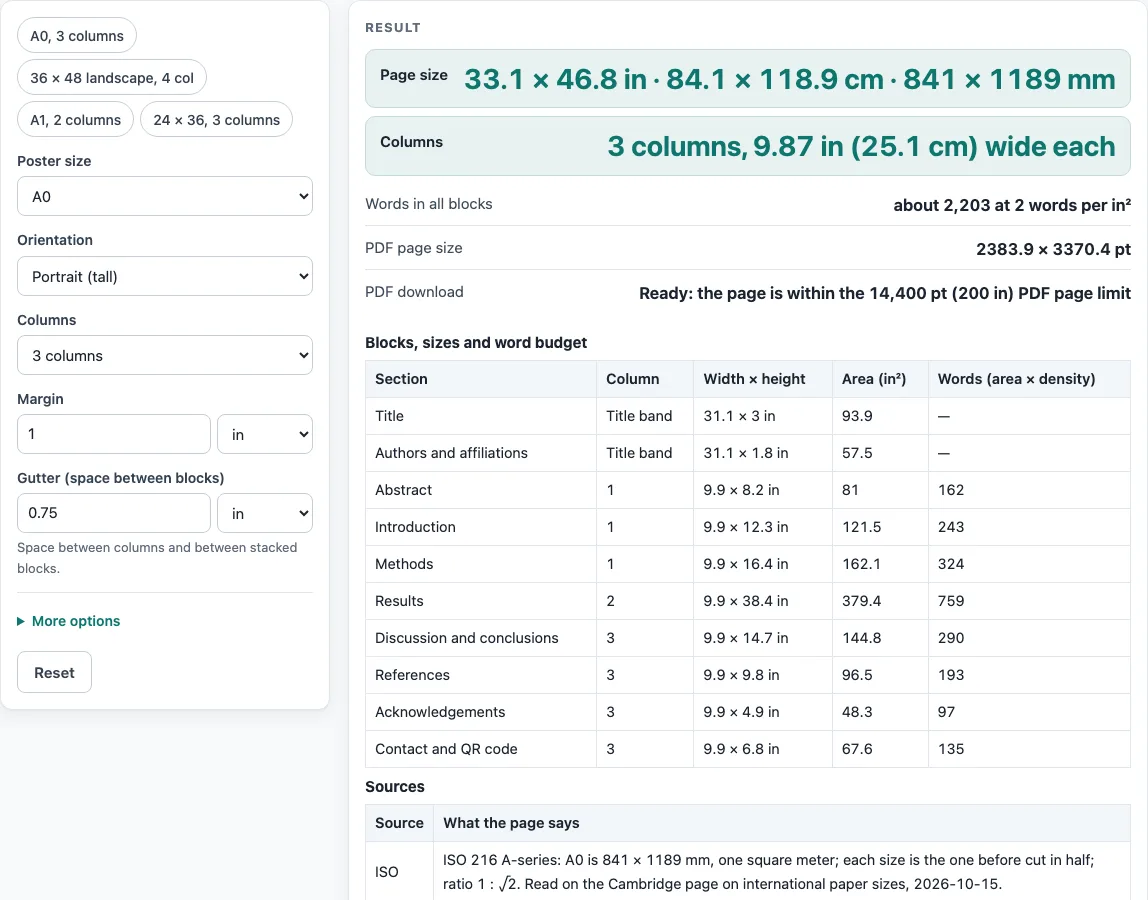
Presets are available for A0 with 3 columns, 36 x 48 landscape with 4 columns, A1 with 2 columns, and 24 x 36 with 3 columns. The PDF is a layout guide to draw over or replace in a layout program. The SVG shows the same layout at true inch size. The tool shows an error if no block is ticked, if the margin leaves no room, or if the density is outside 0.01 to 100.
What is a research poster template and what does it set out?
A research poster template is a planned layout that decides where the title, authors, text sections and references go on a sheet of a set size. This page works out that layout from your inputs. It does not design the finished poster, and it does not place your figures or photos.
How does the tool work out block sizes and word budgets?
The page first sets aside a band for the title and authors across the full width. The band is 12 % of the poster height, with the title taking 62 % of it and the authors the rest when both are ticked. The other blocks are placed in order into columns by relative weight: abstract 1, introduction 1.5, methods 2, results 3, discussion 1.5, references 1, acknowledgements 0.5 and contact 0.7. Each column is stacked to fill. These weights are the tool’s own rules, not published ones.
Column width is calculated as (page width − 2 × margin − gutters between columns) ÷ columns. For the default A0 portrait poster with 3 columns, a 1 in margin and a 0.75 in gutter, the column width is 9.87 in (25.1 cm).
A word budget is calculated as block area (in²) × density. At the default density of 2, the results block measures 9.87 x 38.44 in, which gives 759 words. All blocks together come to about 2,203 words. No published source gives a standard density, so the number is only a starting point until you test it on your own text. The title and authors have no budget.
Which poster sizes do sources give?
Sources do not agree. The “36x48 poster” keyword is used for both 36 wide by 48 tall and 48 wide by 36 tall, so the page shows both orientations. IEEE and the MiALA board both describe 36 x 48 as landscape. The ICPRP/IIUM size (95 x 120 cm, up to 150 cm high) and the ISSBD recommendation (90 x 150 cm) are both portrait but differ, so both are shown side by side. Berkeley CTML recommends 30 x 40 in but allows up to 42 x 42 in, the HFES board space is 42 x 42 in, and a postpartum page allows 48 x 48 in.
A0 measures 33.11 x 46.81 in, so it is not 36 x 48 in. The 36 x 48 size is 73.4 mm wider and 30.2 mm taller than A0. One HFES sheet converts 42 in as both 106.68 cm and 160.68 cm; the tool uses 42 in only. Check the current author guide of your event or journal before you submit.
Worked examples
| Input | Result |
|---|---|
| 33.1 × 46.8 in, 3 columns | about 2,203 words in all blocks |
| 48 × 36 in, 4 columns | about 2,466 words in all blocks |
| 23.4 × 33.1 in, 2 columns | about 1,026 words in all blocks |
| 39.4 × 59.1 in, 3 columns | about 3,367 words in all blocks |
Calculated by the tool above; open it with the same values to see each step.
Frequently asked questions
Is this research poster template free to use?
Yes. It runs in your browser, needs no sign-up, and files are read inside the browser and never uploaded.
What poster size should I choose?
Choose the size that your event or journal asks for. Sources differ: the ICPRP/IIUM and ISSBD sizes are both portrait but not the same, and maximum sizes vary by event. Check the current author guide before you submit.
Why doesn’t A0 match 36 x 48 in?
A0 measures 33.11 x 46.81 in, so it is a different size. The page shows that 36 x 48 in is 73.4 mm wider and 30.2 mm taller than A0.
Can I print the PDF as my finished poster?
No. The PDF is a layout guide with outlined boxes, bold block names and light grey guide text. You can draw over it or replace it in a layout program to make the finished design.
Why do I see a warning about blocks or columns?
If you tick fewer body blocks than columns, the template uses as many columns as blocks and warns you. A margin under 0.5 in also gives a warning. Columns other than 2, 3 or 4 cause an error, and so does selecting no sections.
What happens if my poster is above the PDF limit?
Above 200 x 200 in, the PDF button is disabled with a warning. ISO 32000-1 Annex C advises at most 14,400 x 14,400 units, which is 200 x 200 in. The SVG download still works at that size.
Related tools
- 36x48 poster: use it to check the 36 x 48 in size and its two orientations.
- A0 poster size: use it when you need the A0 dimensions before planning columns.
- A1 poster size: use it to compare A1 dimensions with larger or smaller sheets.
- A2 poster size: use it for a smaller sheet size.
- Conference poster size: use it to see the sizes that conferences commonly list.
- Poster dimensions: use it to convert a size between inches, centimetres and millimetres.
- Poster Font Size Calculator: use it to plan text size once your layout is set.
- Scientific poster size: use it when a scientific event or journal names its own size.