Poster Font Size Calculator
Enter the viewing distance and pick title, heading, body or caption to see what two university guides suggest, and the size to set in your file.
Recent
Your last 10 settings, saved only in this browser. Nothing is uploaded.
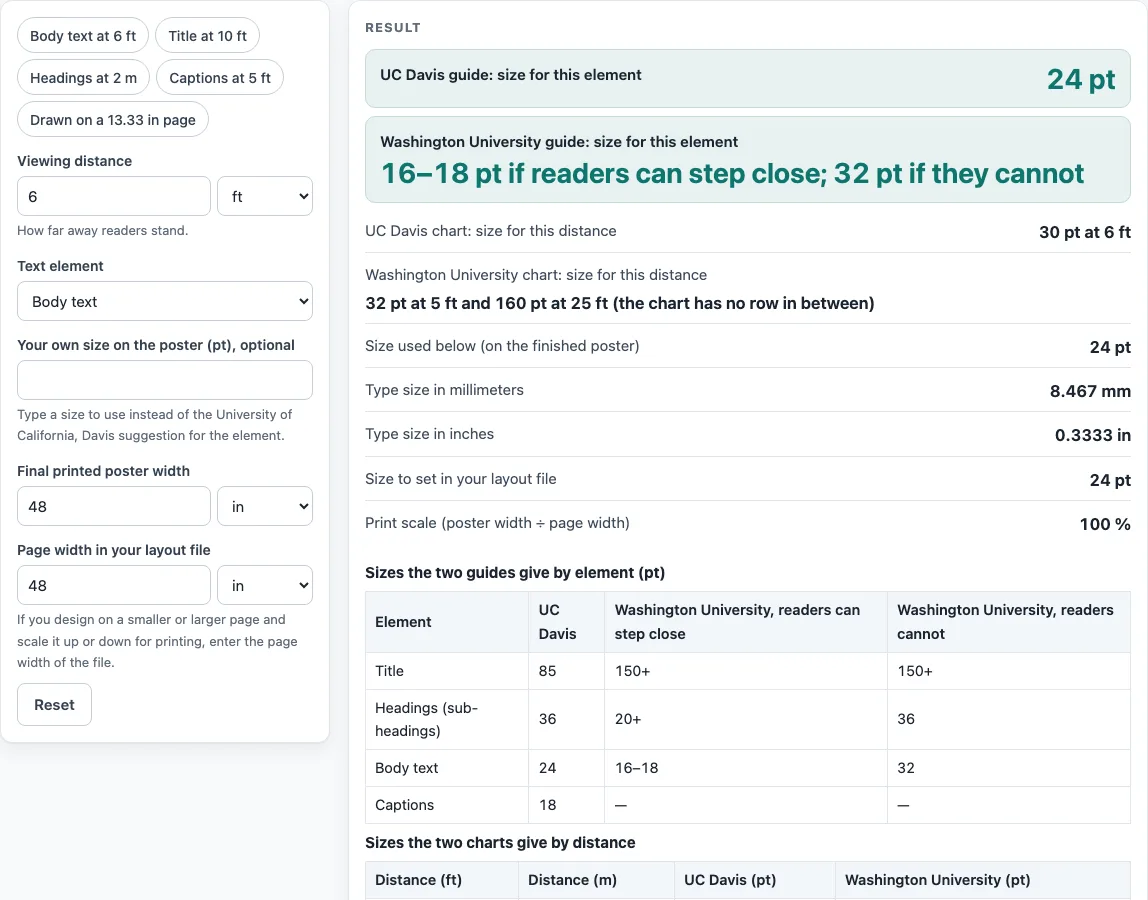
How to use the Poster Font Size Calculator
- Enter your viewing distance in feet or meters. This is how far away readers stand, such as 6 ft.
- Choose the element: title, headings, body or captions.
- Optional: type your own size in pt. If you leave it empty, the tool uses the UC Davis size for that element.
- Read the results. Each guide’s size appears side by side, and the two are never averaged. If your distance falls between two chart rows, the page names both rows and does not interpolate.
- Check any warning. It appears when the size used is below a chart value for a distance equal to or shorter than yours. The warning also explains the direction: a scale under 100% shrinks the text, and a scale above 100% enlarges it.
- Enter the final poster width and the page width of your layout file. The tool calculates the print scale as poster width ÷ page width, and the size to set in the file as size on the poster ÷ scale.
- To start quickly, use the Presets: body text at 6 ft, title at 10 ft, headings at 2 m, and captions at 5 ft, drawn on a 13.33 in page.
Use the sizes in the results as a checking tool only. Confirm the required sizes in the journal’s current author guide before you print or submit.
What is poster font size?
Poster font size is the height of the type, measured in points (pt). One point is 1/72 of an inch, so 24 pt equals 1/3 in or 8.47 mm of type size. This is the em height of the font; capital letters are shorter than this.
Posters use different sizes for different parts. The UC Davis Undergraduate Research Center (2017) lists 85 pt for the title, 56 pt for authors, 36 pt for sub-headings, 24 pt for body text and 18 pt for captions. The tool does not offer the authors line as an element, so only the other four appear in its tables. UC Davis notes that these depend on a specific poster size. Washington University’s Knight ADRC gives no caption size, so this page says so.
The two guides also differ on body text. UC Davis gives 24 pt. Washington University gives 16–18 pt if readers can step close to the poster, and 32 pt if they cannot. The tool shows these conflicts side by side, so you can compare them directly.
How does viewing distance set poster font size?
Both guides give larger type for a longer viewing distance. UC Davis also says its sizes should be legible from around 5-7 feet. The UC Davis chart lists 30 pt at 6 ft, 48 pt at 10 ft, 60 pt at 12 ft and 72 pt at 14 ft. Washington University’s minimum comfortable sizes are 8 pt at 1.2 ft, 16 pt at 2.4 ft, 32 pt at 5 ft and 160 pt at 25 ft.
Where your distance falls between two chart rows, the tool does not calculate a value in between. The default result is body text at 6 ft, where UC Davis gives 24 pt for body text but 30 pt on its 6 ft chart row, and Washington University gives 16–18 pt or 32 pt. For example, a distance of 6.56 ft is shown with both 30 pt at 6 ft and 48 pt at 10 ft.
Your printed size depends on the scale of the layout file. The print scale is the poster width divided by the page width. The size to set in the file is the size on the poster divided by the scale. For a 48 in poster made from a 13.333 in page, the scale is 360%. So 24 pt text on the poster is set as 6.67 pt in the file (24 ÷ 3.6). A scale under 100% shrinks the text, and a scale above 100% enlarges it.
Check the sizes against the journal’s current author guide before you submit, since publisher specifications change.
Worked examples
| Input | Result |
|---|---|
| body text, viewed from 6 ft | 24 pt = 8.467 mm type size |
| title text, viewed from 10 ft | 85 pt = 29.99 mm type size |
| heading text, viewed from 2 m | 36 pt = 12.7 mm type size |
| body text, viewed from 6 ft | 24 pt = 8.467 mm type size |
| caption text, viewed from 5 ft | 20 pt = 7.056 mm type size |
Calculated by the tool above; open it with the same values to see each step.
Frequently asked questions
What is the right poster font size?
The tool does not give one right size. It shows what each guide says for your viewing distance and element. For body text at 6 ft, UC Davis gives 24 pt for body text, but its 6 ft chart row gives 30 pt.
What font size should body text be on a poster?
UC Davis gives 24 pt for body text. Washington University gives 16–18 pt if readers can step close, and 32 pt if they cannot. The tool’s default for body text at 6 ft uses the UC Davis size, and the page shows the other figures beside it.
Why do the two guides give different sizes?
The two guides are written for different situations. Washington University splits its sizes by whether readers can step close, and UC Davis says its sizes depend on a specific poster size. The tool shows both results side by side and does not average them. Check the journal’s current author guide to see which requirements apply to you.
What does a font size warning mean?
A warning appears when the size you are using is below a chart value for a distance equal to or shorter than yours. For example, 24 pt body text at 6 ft is below both charts. The warning also explains that a scale under 100% shrinks the text.
Why does my size change when I change the page width?
The size to set in the file equals the size on the poster divided by the print scale. The print scale is the poster width divided by the page width. A wider page makes the scale smaller, so you need to set a larger size in the file.
Does Washington University give a caption size?
No. Washington University’s guide gives no caption size, so the tool says so. UC Davis gives 18 pt for captions and notes that this depends on the poster size.
Related tools
- 36x48 poster: Use this when your poster is 36 by 48 inches and you want to check its layout.
- A0 poster size: Use this when you are working with the A0 format.
- A1 poster size: Use this when you are working with the A1 format.
- A2 poster size: Use this when you are working with the A2 format.
- Conference poster size: Use this when you are preparing a poster for a conference.
- Poster dimensions: Use this when you want to compare the width and height of different poster sizes.
- Research poster template: Use this when you are setting up the layout for a research poster.
- Scientific poster size: Use this when you are choosing a size for a scientific poster.