Poster dimensions
Pick a size or type any width and height to see inches, cm, mm, aspect ratio and the pixels a poster file needs at your dpi.
Recent
Your last 10 settings, saved only in this browser. Nothing is uploaded.
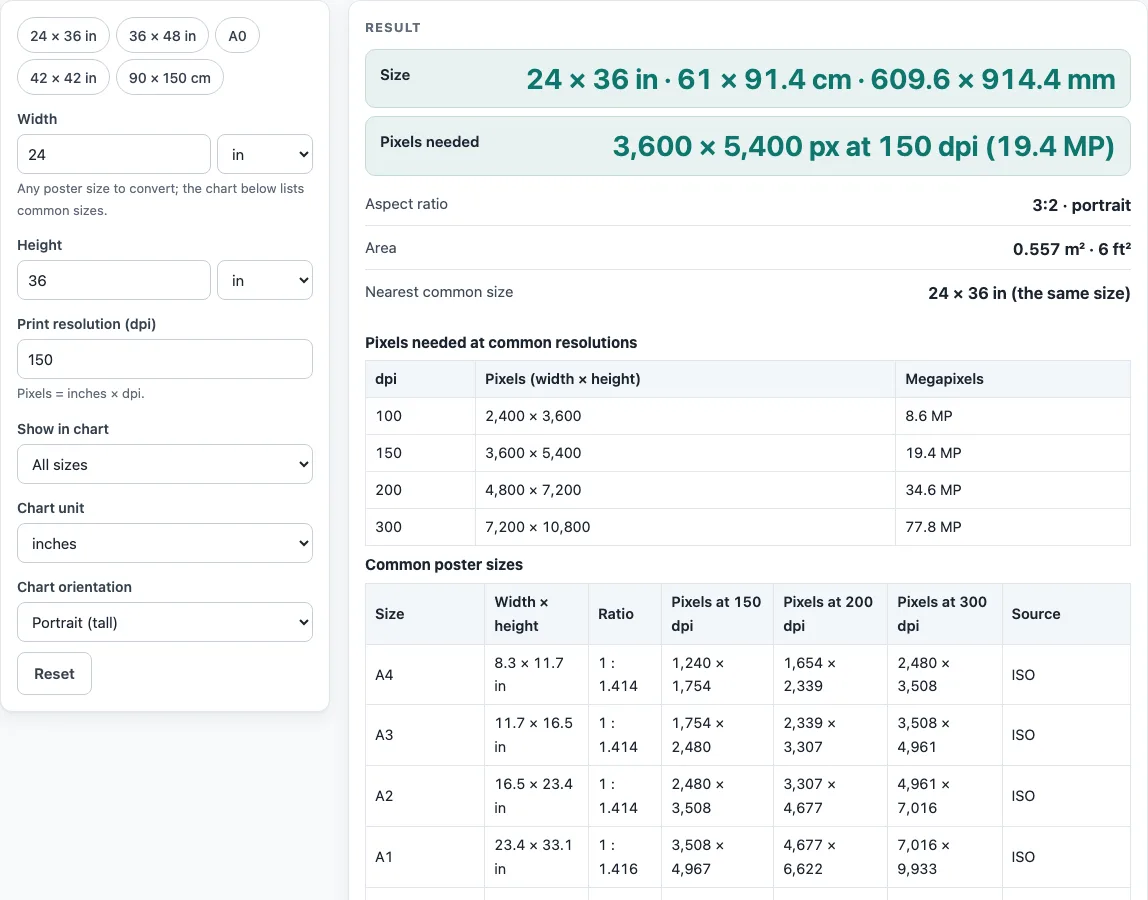
How to use the poster dimensions tool
- Choose a preset (“24 x 36 in”, “36 x 48 in”, “A0”, “42 x 42 in” or “90 x 150 cm”), or type your own width and height.
- Select the unit you are typing in: inches, centimeters, millimeters, feet or meters.
- Set “Print resolution (dpi)”. The default is 150. The tool accepts values from 10 to 2400.
- Read the size in inches, cm and mm.
- Read the pixels needed at your dpi, with the megapixel count.
- Read the aspect ratio. It appears as 3:2, 4:3 or 1:1 when it matches within 0.0005, and as 1 : x otherwise.
- Read the area in m2 and ft2, and check the nearest common size and its difference in mm.
- For the chart (“Common poster sizes”), use “Show in chart” (“All sizes”, “US print sizes”, “ISO A-series” or “Sizes conferences name”), “Chart unit” and “Chart orientation” (“Portrait (tall)” or “Landscape (wide)”). These three settings change only the chart. Each size appears with its ratio and its pixels at 150, 200 and 300 dpi.
The second table gives your typed size in pixels at 100, 150, 200 and 300 dpi, so you can compare resolutions side by side. The tool shows an error for a non-number, a size of zero or less, or a dpi outside 10 to 2400. It shows a warning for a side over 200 in or under 3 in, for dpi under 100 (low), and for dpi over 600 (very large file).
What are the standard poster dimensions?
No single poster size is standard. The ISO A-series is a formal standard, while US sizes such as 24 x 36 in and 36 x 48 in are print conventions. Conferences and journals also name their own sizes, so the right dimensions depend on where the poster will be shown.
How does the ISO A-series set poster sizes?
ISO 216 defines the A-series. A0 measures 841 x 1189 mm, has an area of one square meter, and has a ratio of 1 : 1.414. Each size in the series is half of the one before it, so every step keeps the same proportions.
Why do conference and US poster sizes differ?
Sources do not always agree. IEEE Ultrasonics 2015 and the MiALA board both name 36 x 48 in, but IEEE describes it as 36 high by 48 wide, and MiALA as 36 tall by 48 wide, both landscape. The “36x48 poster” keyword is also used for 48 wide by 36 tall, so this tool shows both orientations.
Maximum sizes vary by event too. Berkeley CTML recommends 30 x 40 in and allows up to 42 x 42 in, HFES board space is 42 x 42 in, and the postpartum page allows 48 x 48 in. ICPRP/IIUM lists 95 x 120 cm, up to 150 cm high, while ISSBD recommends 90 x 150 cm. Both portrait listings appear side by side here rather than being averaged.
How do width, height and orientation change the result?
Swapping width and height turns a portrait poster into a landscape one. The aspect ratio stays the same because it is long:short, but the pixel width and height swap too. A0 is not the same as 36 x 48 in. The page shows that 36 x 48 in is 73.4 mm wider and 30.2 mm taller than A0.
How are pixels calculated from poster size and dpi?
Pixels equal inches multiplied by dpi, rounded to a whole number. A 36 x 48 in poster at 300 dpi is 10,800 x 14,400 px, which is 155.5 MP. A 24 x 36 in poster at 150 dpi is 3,600 x 5,400 px, or 19.4 MP, the default result.
Why does the aspect ratio show as 1 : x?
The ratio compares the long side to the short side. It is shown as a small whole ratio only when it matches within 0.0005, such as 3:2, 4:3 or 1:1. Any other size appears as 1 : x, for example the 1 : 1.414 of the A-series.
Will the results match what a printer produces?
Results are calculated from the numbers you enter. Printers and layout programs round differently, so compare the output against your own print settings. Check the current author guide for any journal or event before you submit.
Worked examples
| Input | Result |
|---|---|
| 24 × 36 in at 150 dpi | 3,600 × 5,400 px |
| 36 × 48 in at 300 dpi | 10,800 × 14,400 px |
| 33.11 × 46.81 in at 150 dpi | 4,967 × 7,022 px |
| 42 × 42 in at 150 dpi | 6,300 × 6,300 px |
Calculated by the tool above; open it with the same values to see each step.
Frequently asked questions
Which poster size should I choose?
Choose the size that your event or journal names, since maximum sizes differ between sources. The chart can show every group side by side to help you compare.
Is A0 the same as 36 x 48 in?
No. A0 is 841 x 1189 mm, while 36 x 48 in is 914.4 x 1219.2 mm. The tool shows the difference in mm for each comparison.
What dpi should I enter?
Start with 150, the default value. The tool accepts 10 to 2400, shows a low-resolution warning under 100, and warns about a very large file over 600.
Why does my size show a warning?
A side over 200 in or under 3 in triggers a warning. Check the width and height, and the unit you selected.
Why is my ratio shown as 1 : x?
The ratio is shown as a whole ratio only when it matches within 0.0005. Otherwise the tool shows the long side against a short side of 1.
Do I need to sign up to use it?
No. The tool is free and needs no sign-up. The numbers you type stay in your browser.
Are the sizes official?
The ISO sizes come from the ISO 216 A-series. US sizes are print conventions, not a standard, and conference sizes come from the named guides. Those guides change, so the event’s current author guide decides which size to use.
Related tools
- 36x48 poster: Use this when you need the details for the 36 x 48 size.
- A0 poster size: Use this to check the A0 dimensions and how they compare with US sizes.
- A1 poster size: Use this when your poster is one size smaller than A0.
- A2 poster size: Use this when you need a smaller ISO poster.
- Conference poster size: Use this to compare the sizes that conferences name.
- Poster Font Size Calculator: Use this to plan text sizes once you know the poster size.
- Research poster template: Use this to find a layout to start from.
- Scientific poster size: Use this to look at common sizes for scientific posters.