PLOS Figure Requirements
The PLOS ONE Figures page in numbers: file formats, dpi band, width and height limits, file size, colour mode and TIFF rules, each with its source, plus a checker for your figure file.
Recent
Your last 10 settings, saved only in this browser. Nothing is uploaded.
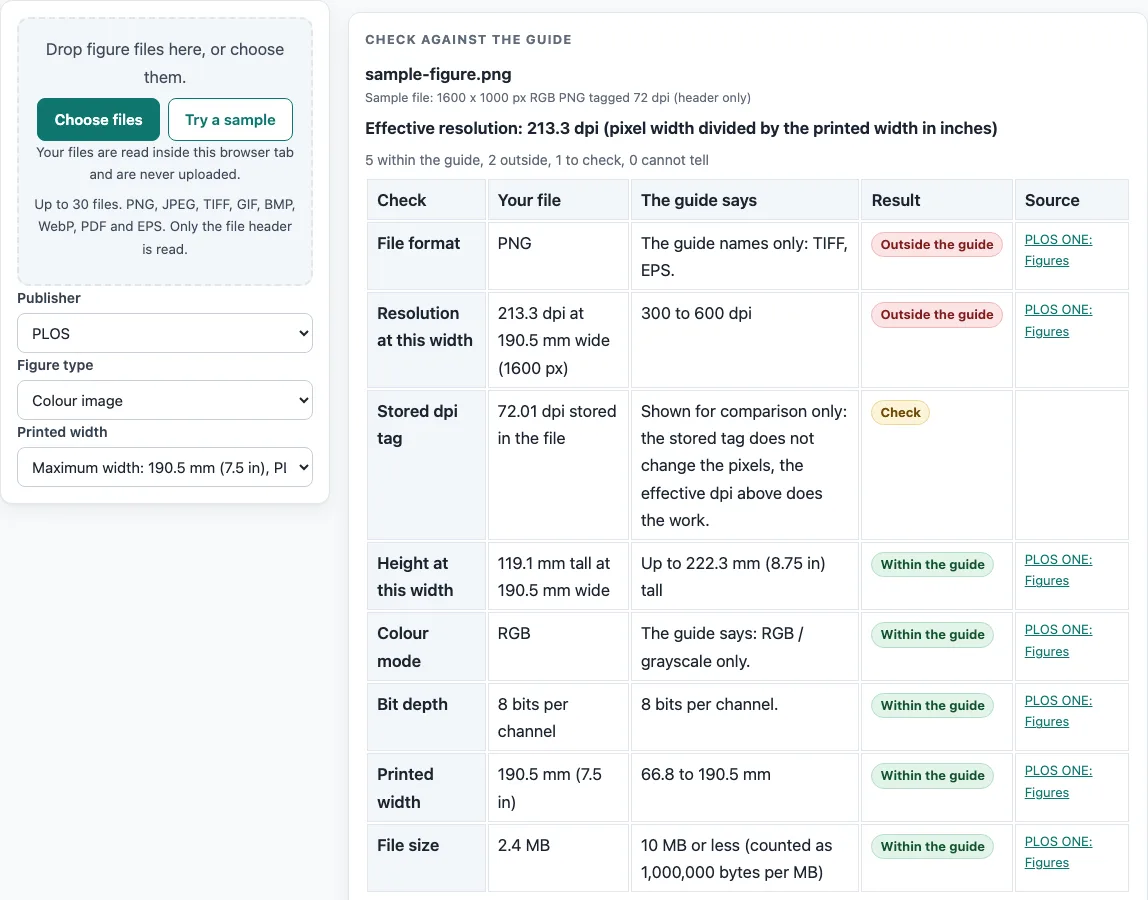
How to use the PLOS Figure Requirements checker
- Choose PLOS as the publisher, then pick your figure type: line art (black and white), grayscale image, colour image, or combination (image and line art). The page gives the same numbers for all four types.
- Pick the printed width from the list: Minimum width (66.8 mm, 2.63 in), Text column tip (132 mm, 5.2 in) or Maximum width (190.5 mm, 7.5 in). You can also type your own.
- Drop your figure file on the checker. The file is read in the browser and not uploaded.
- Read the resolution row. The tool divides your pixel width by the printed width, and the guide gives 300 to 600 dpi.
- Read the colour mode row. The guide says RGB or grayscale only, at 8 bits per channel.
- Read the format row. The guide names TIFF and EPS. For TIFF, the file must be flattened with no layers, have no alpha channels, use LZW compression, and not span several pages.
- Read the height and file size rows. The height can be up to 222.3 mm (8.75 in), and the file size is 10 MB or less, counted as 1,000,000 bytes per MB.
- Read the notes. They give the fonts (Arial, Times or Symbol only, 8 to 12 pt), the rule to embed fonts or convert them to outlines, and the 20 MB limit for the single PDF of raw blot and gel images.
Check the journal’s current author guide before you submit.
What does 300 to 600 dpi mean for a PLOS figure?
Resolution is the number of dots per inch (dpi) in your figure. The PLOS ONE Figures page gives 300 to 600 dpi for line art, grayscale, colour and combination figures. Below 300 dpi, the page says, figures look blurred or pixelated. Above 600 dpi, the page says the published figure may be resized.
The page’s pixel table is calculated at 300 dpi, which is the lower end of the range. A figure above 600 dpi is shown here as a note, not as a failure. If your figure is above 600 dpi, read the note and check the journal’s current author guide.
How do the width, height and pixel values fit together?
Pixel size is found by multiplying the size in inches by the dpi: pixels = inches x dpi. At 300 dpi, the minimum width of 2.63 in gives 789 px, and the maximum width of 7.5 in gives 2250 px. The maximum height of 8.75 in gives 2625 px. These match the pixel table on the page, which lists widths from 789 to 2250 px (6.68 to 19.05 cm) and heights up to 2625 px (22.23 cm).
The text column tip is 132 mm (5.2 in). The page recommends a 2-point white border around each figure, and a figure no wider than 5.2 in (13.2 cm) lines up with the text column. This is a tip, not a rule, so a wider figure is still within the stated maximum width of 190.5 mm.
What do the colour, font and file rules say?
Colour mode and fonts also affect how a figure looks once it is published. The page says RGB or grayscale at 8 bits per channel. It allows Arial, Times or Symbol only, at 8 to 12 pt, and asks you to embed the fonts or convert the text to outlines so that no characters go missing or render wrongly.
File rules are short. The page names TIFF and EPS. A TIFF must be flattened with no layers, must have no alpha channels, must use LZW compression and must not span several pages. Each file should be 10 MB or less, and the single PDF of original blot and gel images has a 20 MB maximum.
What does this page not cover?
Only the PLOS ONE Figures page was read. Other PLOS journals may differ, and the journal’s own current author guide decides. The page gives no separate dpi for each figure type, no CMYK statement and no minimum line weight, so the checker shows none of these. Publisher specifications change, so read the live page again before you export your final files.
Frequently asked questions
What are the PLOS figure requirements for resolution?
The PLOS ONE Figures page gives 300 to 600 dpi for line art, grayscale, colour and combination figures. The pixel table is calculated at 300 dpi.
Which file formats does the PLOS figure page name?
The page names TIFF and EPS. TIFF files must be flattened, have no layers or alpha channels, use LZW compression, and not span several pages.
What is the maximum file size for a PLOS figure?
The page gives 10 MB or less per figure, counted as 1,000,000 bytes per MB. Raw blot and gel images go in a single PDF with a 20 MB maximum.
Is a figure above 600 dpi a failure under the PLOS figure page?
No. The page says a figure above 600 dpi may be resized in publication, and this tool shows it as a note, not a failure.
Which fonts does the PLOS figure page allow?
The page allows Arial, Times or Symbol only, at 8 to 12 pt. Embed the fonts or convert them to outlines to prevent missing or wrongly rendered text.
Does a result here mean PLOS will take my figure?
No. Results show what the named page says, calculated from your file. They are not a decision by PLOS. Check the journal’s current author guide before you submit.
Do these numbers apply to every PLOS journal?
Not necessarily. Only the PLOS ONE Figures page was read, so other PLOS journals may differ. The journal’s own current author guide decides.
Related tools
- ACS Figure Requirements: use it when your target journal follows ACS figure rules.
- Elsevier Figure Requirements: use it when you are preparing a figure for an Elsevier journal.
- Embed Fonts in PDF Checker: use it when you need to check fonts in a PDF figure.
- Journal Figure Size Calculator: use it when you need to convert figure sizes for a journal.
- IEEE Figure Requirements: use it when your target venue follows IEEE figure rules.
- Journal Figure Checker: use it when you want to check a figure against a journal’s listed values.
- Springer Nature Figure Requirements: use it when your target journal is a Springer Nature title.
- Wiley Figure Requirements: use it when your target journal is published by Wiley.