IEEE Figure Requirements
What the IEEE Author Center says about graphics resolution, file formats, column widths and maximum size, with sources, and a checker that tests your figure file at one or two column width.
Recent
Your last 10 settings, saved only in this browser. Nothing is uploaded.
The IEEE figure requirements are the resolution, file format, size, font and layer rules that the IEEE Author Center lists for graphics in journal articles. This page compares your own figure file with those rules, using the values from the two named Author Center pages. The checker runs inside your browser, so your files are read on your device and never uploaded. It is free and needs no sign-up.
Use it to check resolution for line art, grayscale and colour images, file format, single and double column widths, maximum height, font size and font embedding. Results are calculated from your file or stated as what the named guide says. IEEE writes its minimum resolutions as greater than 300 dpi and greater than 600 dpi. Publisher specifications change, so check the current IEEE guide for your publication before you submit.
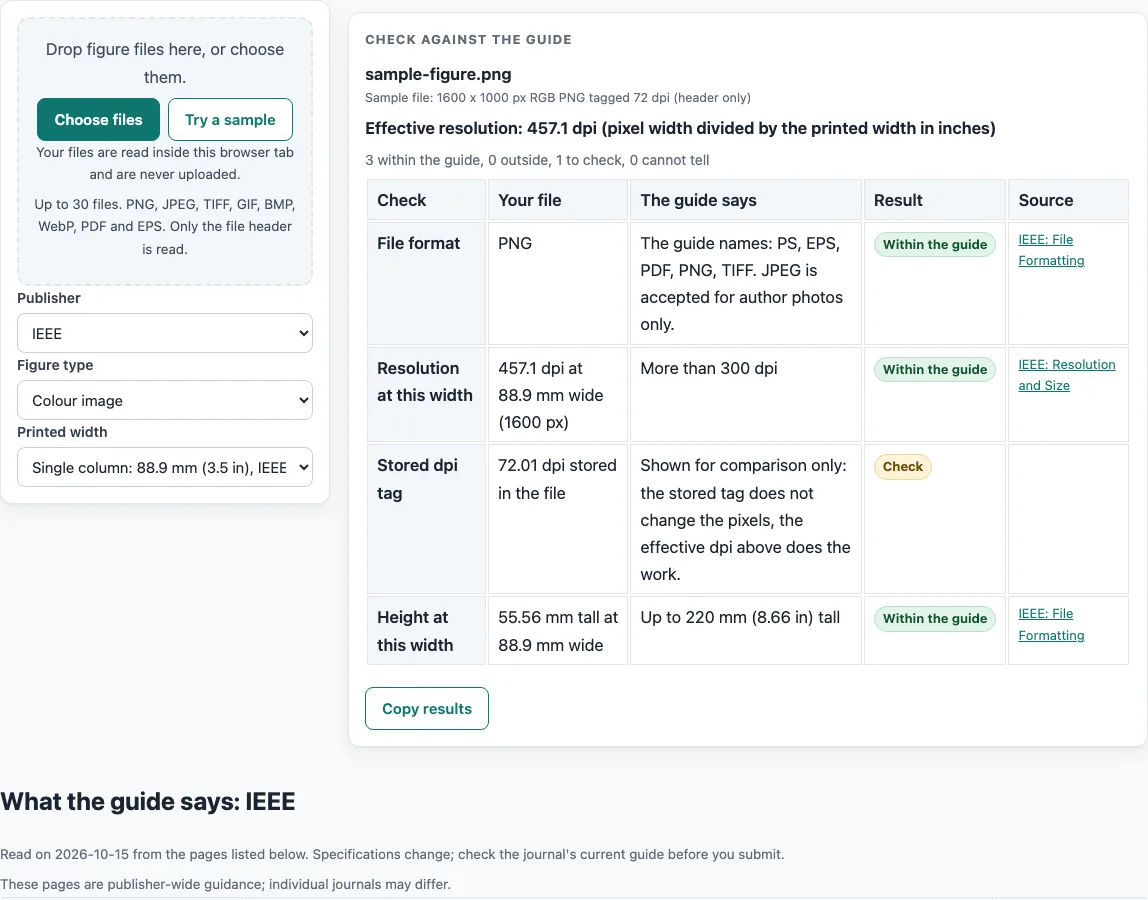
How to use the IEEE Figure Requirements checker
- Choose IEEE as the publisher, then pick the figure type: Line art (black and white), Grayscale image or Colour image. The guide gives no resolution for combination art.
- Pick the printed width. The list offers Single column (88.9 mm, 3.5 in) and Double column (182 mm). You can also type your own width in millimetres, centimetres or inches.
- Drop your figure file on the checker. The file is read in the browser and not uploaded.
- Read the resolution row. The tool divides your pixel width by the printed width, and the guide asks for more than 600 dpi for line art and more than 300 dpi for grayscale and colour.
- Read the file format row. The guide names PS, EPS, PDF, PNG and TIFF. It says GIF, BMP and JPEG cannot be used, and JPEG is accepted for author photos only.
- Read the height row, which compares your figure with up to 220 mm (8.66 in).
- Read the notes under the table. They give the fonts (Helvetica, Times New Roman, Arial, Cambria and Symbol), the type size of approximately 9 to 10 pt at full size, the rule to embed fonts or convert text to outlines for EPS, PS or PDF, and the flattened layers.
The checker treats the dpi minimums as strictly greater than the stated values, so a figure at exactly 300 dpi is not above the minimum. Check the current IEEE guide before you submit.
What are the IEEE figure requirements?
The IEEE figure requirements are a set of limits on how a figure is produced: its resolution, file format, width, height, fonts and layers. Each limit is stated on the IEEE Author Center pages named Resolution and Size and File Formatting, and this page checks your figure against those stated values. Results describe what the named guide says. They are not a decision by IEEE or by any journal.
Resolution is measured in dpi, meaning dots per inch. A higher dpi gives more detail when the figure is printed at its set size. IEEE sets different minimums by image type: more than 600 dpi for line art in black and white, and more than 300 dpi for grayscale and colour images. IEEE writes these as “greater than” values, and the checker applies them as strictly greater than, so the boundary value does not count as above the minimum. The guide gives no resolution for combination art, no colour mode, no maximum file size and no minimum line weight, so the checker leaves those rows out.
How do width, height and file format limits work together?
Width is set by column. A single column is 88.9 mm (3.5 in) wide, and a double column is 182 mm (7.17 in) wide. IEEE recommends not sizing graphics narrower than one column, because extreme enlargement may distort them. Height can be up to 220 mm (8.66 in), and the overall graphic should be no larger than 182 x 220 mm (43 x 52 picas).
File format and fonts affect how the figure prints. The guide names PS, EPS, PDF, PNG and TIFF as formats it lists. It says GIF, BMP and JPEG cannot be used, with JPEG allowed for author photos only. Text should be set in Helvetica, Times New Roman, Arial, Cambria or Symbol, at approximately 9 to 10 pt when viewed at full size. For EPS, PS or PDF files, either convert all text to outlines or embed the fonts. All image layers should be flattened.
Which IEEE rules are not covered here?
Only two Author Center pages were read. IEEE magazine and conference guidelines were not read, and the separate IEEE Standards graphics guide could not be used, so none of its numbers appear on this page. If your paper goes to a conference or magazine, its own author instructions may differ.
Publisher specifications also change over time, so the journal’s current author guide decides. Treat this page as a quick way to compare a file with the numbers that were printed on the two pages on the day they were read.
Frequently asked questions
Is 300 dpi enough for IEEE figures?
For grayscale and colour images, IEEE writes the minimum as more than 300 dpi. The checker treats this as strictly greater than, so a figure at exactly 300 dpi is not above the minimum. For line art, the minimum is more than 600 dpi.
Which file formats does the IEEE guide list?
The guide names PS, EPS, PDF, PNG and TIFF. It says GIF, BMP and JPEG cannot be used. JPEG is the exception for author photos only.
Can I use a JPEG for an IEEE figure?
The guide does not allow JPEG for figures. It is named only for author photos. If your figure is a JPEG, export it again in one of the named formats and check the result again.
What is the maximum size for an IEEE graphic?
The graphic should be no larger than 7.16 x 8.8 in, which is 182 x 220 mm or 43 x 52 picas. The guide also asks that all image layers are flattened.
Should I make my figure narrower than one column?
IEEE recommends not sizing graphics narrower than one column. The reason given is that extreme enlargement may distort them. A single column is 88.9 mm (3.5 in) wide.
Does the tool upload my figure files?
No. Files are read inside your browser and are never uploaded. The tool is free and needs no sign-up.
Does the guide give a resolution for combination art?
No. The two pages read give resolutions only for line art, grayscale and colour images, so the checker shows no resolution row for combination art.
Related tools
- ACS Figure Requirements: use this when your target journal follows ACS figure rules.
- Elsevier Figure Requirements: use this when your target journal is published by Elsevier.
- Embed Fonts in PDF Checker: use this to check font embedding in a PDF figure file.
- Journal Figure Size Calculator: use this to work out figure dimensions from your column width.
- Journal Figure Checker: use this to check a figure against a general set of journal figure rules.
- PLOS Figure Requirements: use this when your target journal is a PLOS title.
- Springer Nature Figure Requirements: use this when your target journal is published by Springer Nature.
- Wiley Figure Requirements: use this when your target journal is published by Wiley.