Embed Fonts in PDF Checker
Choose a PDF to see every font in it, whether it is embedded, whether it is a subset and which pages use it, with a count of the fonts that are missing from the file.
Recent
Your last 10 settings, saved only in this browser. Nothing is uploaded.
If you need to embed fonts in pdf files, this tool reads your PDF and lists every font it uses, showing whether each one is embedded. You choose one PDF file or drop it on the box, and the check runs in your browser. The tool is free and needs no sign-up. Nothing is uploaded, and the PDF is never changed or saved.
A font counts as embedded when the file itself holds the font data, so the results show what the file contains. The output is a headline result, a summary line and a table that you can download as CSV or print. Results are calculated from the file you give it, so check the journal’s current author guide before you submit.
How to use the PDF font embedding checker
- Select one PDF with the file chooser, or drop the PDF onto the box.
- Wait while the file is read. The reading happens in your browser, and nothing is uploaded.
- Read the headline result. It will say “Some fonts are not embedded”, “Unused fonts are not embedded” or “All fonts are embedded”.
- Read the summary line, which gives the outputs Result, Fonts found, Embedded, Not embedded and Subset fonts.
- Check the table. For each font, look at the font name, the font type, Embedded (Yes / No / Built in (Type 3)), Subset (Yes / No) and Pages used.
- Open the “Show” selector and choose “Only fonts that are not embedded” to focus on the problem fonts. Choose “All fonts” to see the full list again.
- Read any warnings. They cover standard fonts missing from the file, fonts listed but not used, Type 3 fonts, and an encrypted PDF whose page text could not be read.
- To keep a record, download the font list as CSV, which has the columns font, type, embedded, subset, used and pages, or print a report.
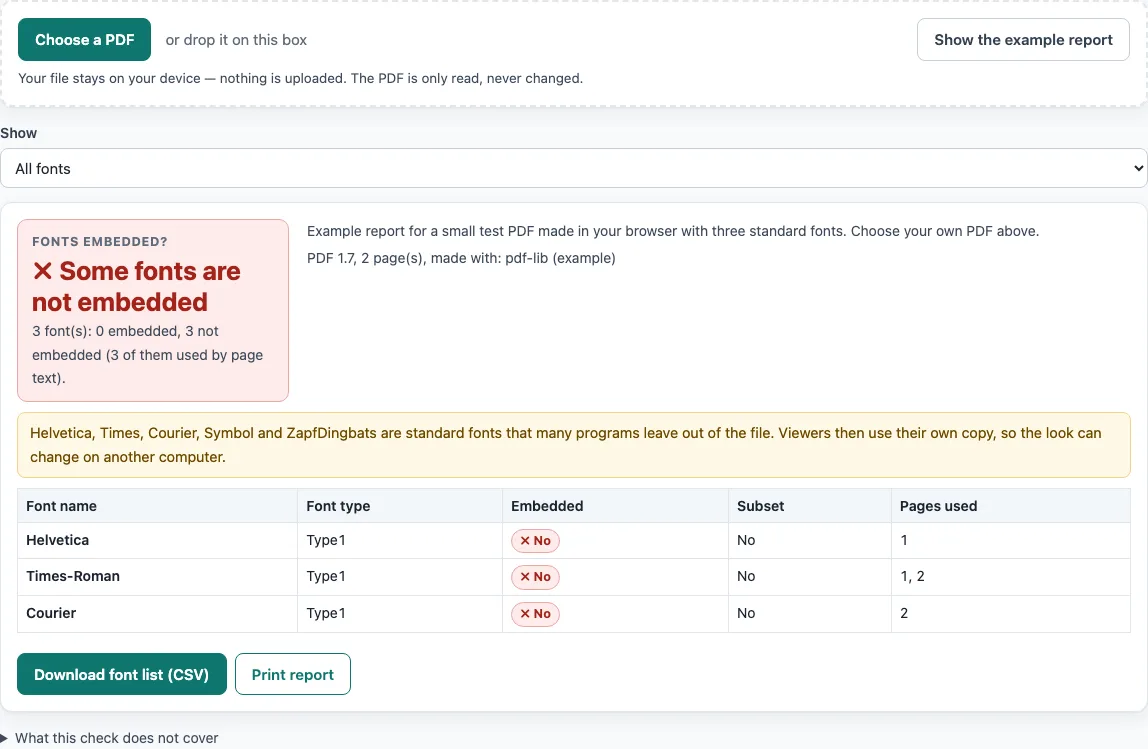
Before you test your own file, press the button that shows an example report to see the layout. The example uses three fonts, none of them embedded, so you can compare it with your results.
What does it mean to embed fonts in a PDF?
Embedding a font means the PDF file contains the font program that draws its letters. A font that is not embedded depends on the reader’s computer having that font installed, so the text may look different elsewhere. This checker treats a font as embedded only when the file holds the font data itself.
How does the checker decide whether a font is embedded?
A font counts as embedded when its font descriptor holds a FontFile, FontFile2 or FontFile3 stream. For Type0 composite fonts, the checker uses the descriptor of the descendant font. The font files are not opened, so the result reports what the file declares and does not confirm that the font data is complete or undamaged.
How is a subset font recognised?
A font counts as a subset when its BaseFont name starts with six capital letters followed by a plus sign, such as ABCDEF+Garamond. The checker removes that prefix from the display name. A subset contains only the glyphs the document uses, so the Subset column tells you how the font was stored, not whether it is complete.
Why does the headline result have three states?
The headline depends on whether a missing font is actually used. “Some fonts are not embedded” appears when at least one non-embedded font is used by page text. “Unused fonts are not embedded” appears when only unused fonts are missing, and “All fonts are embedded” appears otherwise. Pages used come from text that selects the font with the Tf operator, including text inside form XObjects. A font that is only listed in a page’s resources shows “listed, not used”.
How are Type 3 and standard fonts handled?
A Type 3 font has no font file because its glyphs are drawn by content streams inside the PDF. It is listed as Built in (Type 3) and is not counted as missing, although some publishers still ask for outline fonts. Standard fonts (Helvetica, Times, Courier, Symbol and ZapfDingbats) that are missing from the file trigger a warning.
Why do publisher requirements differ?
The sources behind this page do not agree. A 2018 IEEE conference page describing PDF eXpress requires that all fonts are embedded and subset. Elsevier’s artwork page asks authors to choose that all fonts are embedded when exporting EPS, and says non-standard fonts may be substituted. It gives no separate procedure for PDF fonts. Publisher specifications change, so check the current author guide of your journal before you submit.
Worked examples
| Input | Result |
|---|---|
| Example PDF with three standard fonts; show: All fonts | 3 fonts, 3 not embedded: Some fonts are not embedded |
| Example PDF with three standard fonts; show: Only fonts that are not embedded | 3 fonts, 3 not embedded: Some fonts are not embedded |
Calculated by the tool above; open it with the same values to see each step.
Frequently asked questions
Frequently asked questions
Does this checker change or save my PDF?
No. The file is read in your browser, and the PDF is never changed or saved.
What does “listed, not used” mean?
The font appears in a page’s resources, but no page text selects it with the Tf operator. It is shown as unused, so it does not cause the “Some fonts are not embedded” result.
Does a Type 3 font count as missing?
No. It is listed as Built in (Type 3) and is not counted as missing. Some publishers still ask for outline fonts, so check your journal’s current author guide.
Are fonts inside images or outlined text checked?
No. Fonts inside placed images are not listed, and text converted to outlines or pictures has no font to check.
Does the checker open the font files?
No. Font files are not opened, so damaged files or missing glyphs are not detected.
Does an “All fonts are embedded” result settle a journal’s font rules?
No. The result describes the fonts in the file you give it. Publisher rules differ and change over time, so read the journal’s current author guide before you submit.
Does it check font licences or embedding permission flags?
No. Font licensing and embedding permission flags are not checked. The tool only reports whether the font data is in the file.
What happens with an encrypted PDF?
A password-protected PDF may be refused with a message that it could not be opened here. If it opens, the tool warns that page text could not be read, so the pages shown for each font are not reliable.
Related tools
- Journal Figure Checker: use it to check a figure against journal settings in one place.
- Journal Figure Size Calculator: use it to work out figure dimensions from your inputs.
- IEEE Figure Requirements: read what the IEEE-related figure guidance says.
- Elsevier Figure Requirements: read what Elsevier’s figure guidance says, including its EPS export note.
- Springer Nature Figure Requirements: read the figure guidance for Springer Nature journals.
- ACS Figure Requirements: read the figure guidance for ACS journals.