Elsevier Figure Requirements
The numbers from Elsevier's artwork pages (resolution by figure type, file formats, column widths in mm) with their sources, and a checker that tests your file against them at the width you choose.
Recent
Your last 10 settings, saved only in this browser. Nothing is uploaded.
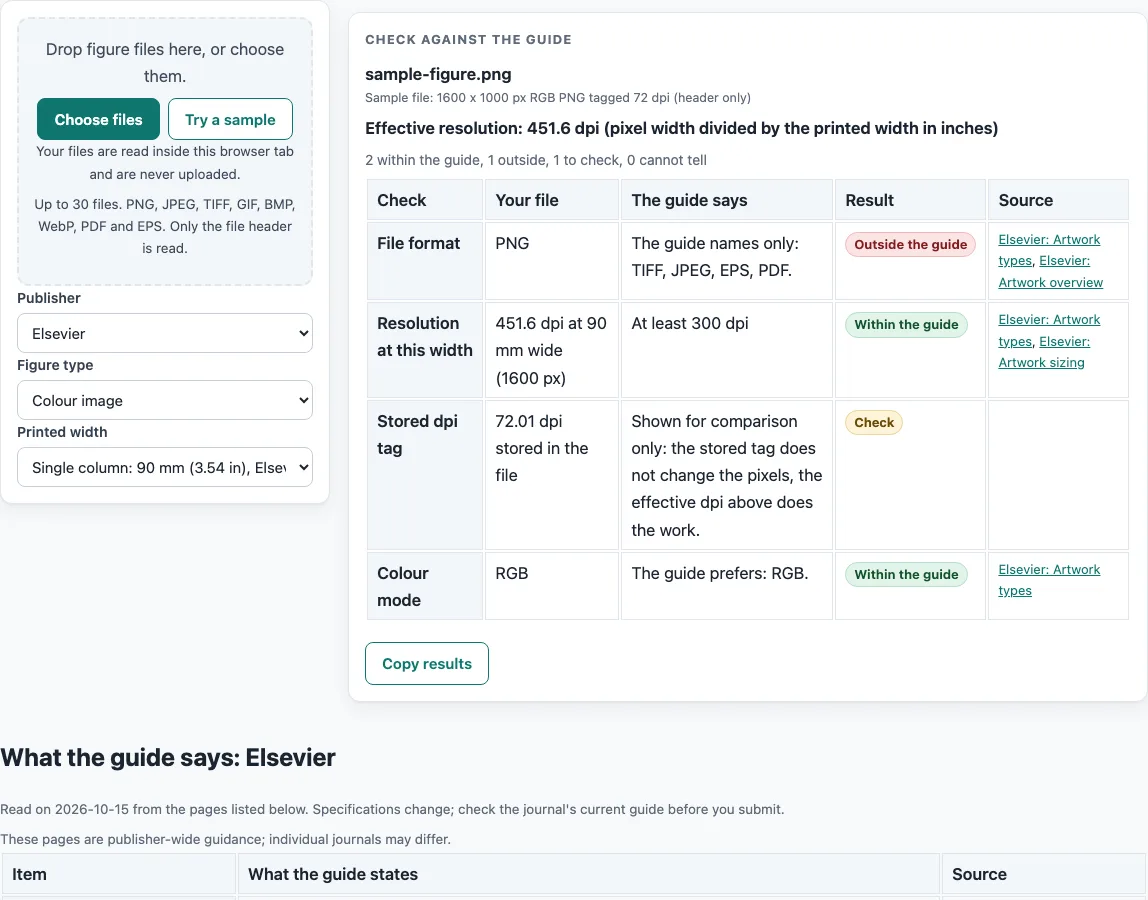
How to use the Elsevier Figure Requirements Checker
- Choose Elsevier as the publisher. Open the current author guide for your target journal and note any special instructions. Those take priority over the common guidelines shown here.
- Choose the figure type that matches your artwork: Line art (black and white), Grayscale image, Colour image, or Combination (image and line art).
- Pick the printed width from the list in the checker, or type your own. The guide gives 30 mm (1.18 in) as the minimum width, 90 mm (3.54 in) for a single column, 140 mm (5.51 in) for 1.5 columns, and 190 mm (7.48 in) for a double column.
- Read the minimum resolution shown for your type. If your line art has very fine lines, also read the conditional note for 1200 dpi.
- Check the colour mode and the file formats listed for your type.
- Calculate the pixel count with the guide’s formula: pixels = resolution (dpi) x print size (inches). For example, 300 dpi at 90 mm gives about 1063 px.
- Check your lettering. The guide gives 7 pt as the finished size for normal text and no smaller than 6 pt for subscripts and superscripts.
- Check your fonts and, for EPS art, confirm that fonts are included or embedded.
- Drop your file on the checker and read its table, which shows your file next to what the guide says.
Results are calculated from your inputs and from what the named guide says. They are not a decision by any journal. Check the journal’s current author guide before you submit, because publisher specifications change.
What are the Elsevier figure requirements for resolution and file type?
Elsevier’s artwork guidance sets a minimum resolution for each figure type. Line art (black and white) needs at least 1000 dpi, or 1200 dpi if the figure has very fine lines. Grayscale images and colour images need at least 300 dpi. Combination figures, which mix images and line art, need at least 500 dpi.
Colour mode also depends on type. Line art must be black and white (1 bit) only. Grayscale images must be grayscale only. Colour images are preferred in RGB, and combination figures are preferred in RGB or grayscale. For file formats, line art can be TIFF, EPS or PDF. Grayscale, colour and combination figures can be TIFF, JPEG, EPS or PDF.
The sources do not fully agree. The Artwork overview suggests exporting TIFF at “1000 dpi for a graph and others 500 dpi”, while the Artwork types page gives 300 dpi as the minimum for grayscale and RGB. For EPS combination art, the Artwork types page gives “300 (500) dpi for halftones and 1000 dpi for line art”, while the TIFF and JPEG combination row gives 500 dpi. This checker uses the per-type minimums of 1000, 300 and 500 dpi. Check the journal’s own guide if your figure falls between these.
How do column widths and pixel counts work for Elsevier figures?
Figure width is set by the column the figure will occupy. The guide lists 30 mm (1.18 in) as the minimum width, 90 mm (3.54 in) for a single column, 140 mm (5.51 in) for 1.5 columns, and 190 mm (7.48 in) for a double column. Pixel count follows directly from the print size: pixels = resolution (dpi) x print size (inches). At 300 dpi, the guide tabulates 354 px for 30 mm, 1063 px for 90 mm, 1654 px for 140 mm and 2244 px for 190 mm.
Lettering should also be checked at print size. The guide gives 7 pt as the finished size for normal text and calls this a rule of thumb. Subscripts and superscripts should be no smaller than 6 pt. For EPS line art, the guide gives line weights from 0.10 pt to 1.5 pt.
Fonts affect how a figure prints. The guide prefers Type 1 or TrueType fonts, preferably Arial (or Helvetica), Courier, Symbol, and Times (or Times New Roman). Other fonts may be substituted, which can cause missing symbols or overlapping type. For EPS art, the guide says to always include or embed fonts.
Frequently asked questions
Is this checker free to use?
Yes. The checker is free, and you do not need to sign up. Files are read inside your browser and are never uploaded.
Does the checker give a decision from a journal?
No. Results are calculated from your inputs and from what the named guide says. They are not a decision by any journal, so check the journal’s current author guide before you submit.
Why do the sources give different dpi values?
The Artwork overview and the Artwork types page do not give identical numbers, and the TIFF and JPEG combination row differs from the EPS combination row. This checker uses the per-type minimums of 1000, 300 and 500 dpi. Where sources differ, the journal’s own guide should decide.
What does the 1200 dpi note mean?
The guide gives 1200 dpi for black and white line art only when the figure has very fine lines. Otherwise, the minimum for line art is 1000 dpi.
What lettering size should I use?
The guide gives 7 pt as the finished printed size for normal text, and it calls this a rule of thumb. Subscripts and superscripts should be no smaller than 6 pt.
Do the journal’s instructions override these guidelines?
Yes. Some Elsevier journals have special instructions beyond these common guidelines, and the journal’s own guide for authors comes first.
Related tools
- ACS Figure Requirements: Use this when your target journal follows ACS guidance instead of Elsevier’s.
- Embed Fonts in PDF Checker: Use this to check font embedding in a PDF before you submit figure files.
- Journal Figure Size Calculator: Use this to work out figure dimensions and pixel counts for a planned print width.
- IEEE Figure Requirements: Use this when your target publication follows IEEE figure guidance.
- Journal Figure Checker: Use this to compare a figure against requirements for a journal you are preparing for.
- PLOS Figure Requirements: Use this when your target journal follows PLOS figure guidance.
- Springer Nature Figure Requirements: Use this when your target journal follows Springer Nature figure guidance.
- Wiley Figure Requirements: Use this when your target journal follows Wiley figure guidance.