Conference poster size
Pick your poster size and type the board size from the call for posters. You get a fit answer, the spare room and whether turning it helps.
Recent
Your last 10 settings, saved only in this browser. Nothing is uploaded.
How to use the Conference Poster Size Checker
- Open the call for posters for your event and note the poster size and the board size it gives.
- Under “Poster size” choose A0, A1, 24 × 36 in, 30 × 40 in, 36 × 48 in, 42 × 42 in or 48 × 48 in, or choose “Custom size” and enter the custom width and height.
- Pick “Portrait (tall)” or “Landscape (wide)” under “Orientation”.
- Type the board width and board height, in inches, cm, mm, ft or m.
- Type the “Free space round the poster”. The default is 1 in, with A0 portrait on a 48 × 36 in board. Enter 0 for edge to edge.
- Read the result: “Fits”, “Fits turned 90°” or “Too big”. The spare room appears in inches and cm.
- If the result is “Too big”, note the overshoot and the scale shown. You can then compare the size against the call for posters and check whether a different board or poster size is allowed.
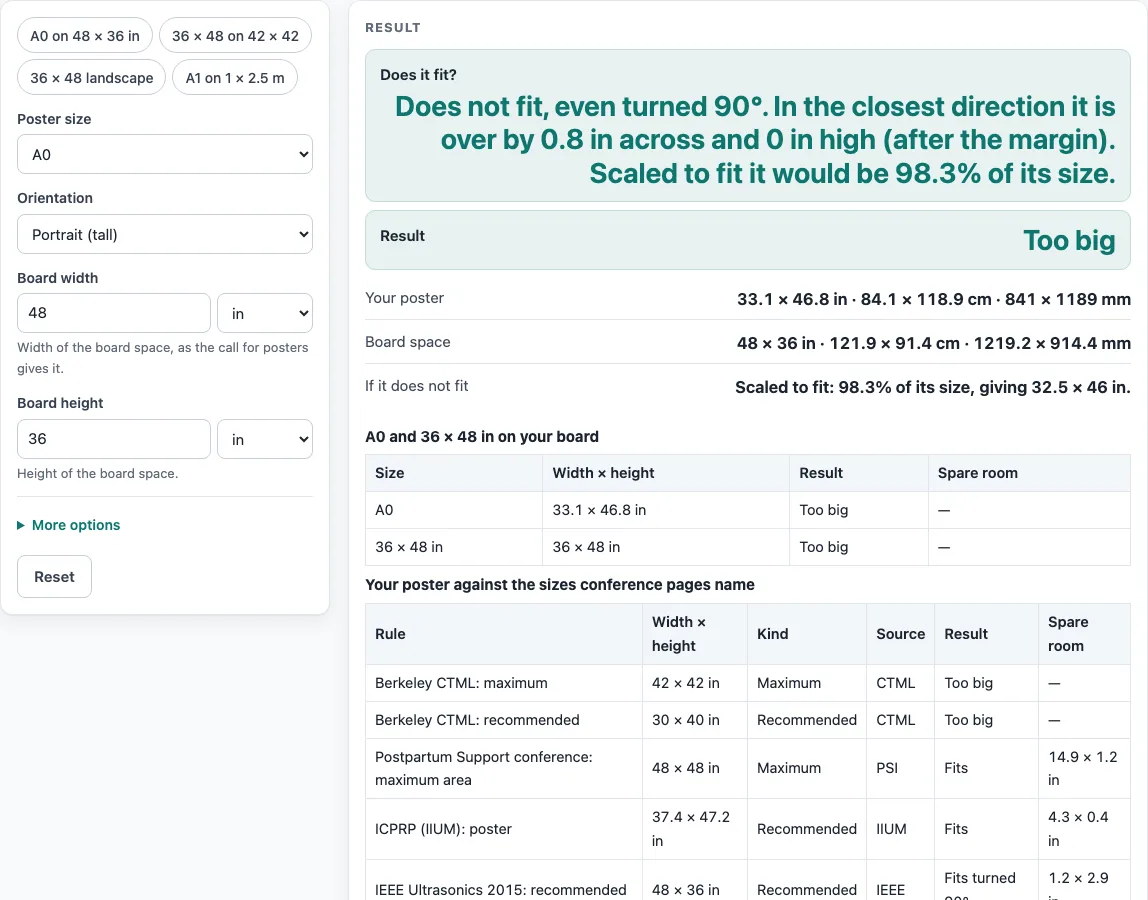
- Scroll to the rules table to compare your poster with the nine rules. Then check the second table, which shows A0 and 36 x 48 in on the board you typed.
The page includes four presets: A0 on 48 x 36 in, 36 x 48 on 42 x 42, 36 x 48 landscape, and A1 on a 1 x 2.5 m board. Choose one as a starting point, then change any value you need. The page only compares the numbers you type, so keep the call for posters open beside it.
What is a conference poster size?
A conference poster size is the width and height an event sets in its call for posters, and these numbers differ from event to event. The rules table lists nine rules read on public conference pages, and it names the source for each one.
Some of these rules are recommendations and others are maximums. Berkeley CTML recommends 30 x 40 in and allows up to 42 x 42 in. IEEE gives 36 high x 48 wide, ICPRP/IIUM gives 95 x 120 cm with up to 150 cm high, and ISSBD recommends 90 x 150 cm. HFES gives a 42 x 42 in board space. The remaining rules cover a 4x4 ft maximum area, a 3x4 ft board with a poster no larger than the board, and a 95x240 cm display board. Nothing is averaged, so the page does not produce a single “right” size.
How does the fit check work?
A poster fits when its width and height are each no larger than the board minus twice the free margin. The margin is taken from each side of the board, so a 1 in margin removes 2 in from each dimension. The check tries the poster as drawn and turned 90 degrees, then reports “Fits”, “Fits turned 90°” or “Too big”, with the spare room in inches and cm.
Take A0 (33.11 x 46.81 in) on a 48 x 36 in board with a 1 in margin. The usable space is 46 x 34 in. As drawn, the height of 46.81 in is more than 34 in. Turned, the long side of 46.81 in is more than the 46 in across. The result is “Too big”, and scaled to fit the poster would be 98.3 % of its size.
With no margin, the same A0 poster fits turned 90 degrees, with spare room of 1.2 x 2.9 in. Results like these are calculated from your inputs, not from any event’s rules.
Why do conference poster sizes disagree?
Several pairs of sources disagree, so the page shows them side by side instead of choosing one. The “36x48 poster” keyword is used for both 36 wide x 48 tall and 48 wide x 36 tall, so the page shows both orientations. ICPRP/IIUM (95 x 120 cm) and ISSBD (90 x 150 cm) are both portrait but differ. Berkeley CTML’s recommended 30 x 40 in is smaller than its 42 x 42 in maximum, and the postpartum page allows 48 x 48 in.
The HFES sheet states 42 in as “106.68 cm” once and “160.68 cm” elsewhere, so the calculation uses 42 in only. A0 is also not the same as 36 x 48 in: 36 x 48 is 73.4 mm wider and 30.2 mm taller than A0. Compare the rules table with the call for posters you were given, not with another event’s page, and check the current requirements before you print.
Worked examples
| Input | Result |
|---|---|
| Poster 33.1 × 46.8 in on a 48 × 36 in board | Too big |
| Poster 48 × 36 in on a 48 × 36 in board | Fits |
| Poster 36 × 48 in on a 42 × 42 in board | Too big |
| Poster 23.4 × 33.1 in on a 39.4 × 98.4 in board | Fits |
Calculated by the tool above; open it with the same values to see each step.
Frequently asked questions
Is conference poster size the same for every event?
No. Each event sets its own size in its call for posters, and the rules table shows that public sources differ. Use the numbers from your event’s call as the target.
Will my A0 file fit a 36 x 48 in board?
With no margin, A0 (33.11 x 46.81 in) fits a 36 x 48 in board with spare room of 2.9 x 1.2 in. With the default 1 in margin the usable space is 34 x 46 in, which is less than the 46.81 in height. The second table compares A0 and 36 x 48 in on the board and margin you typed.
What do the warnings and errors mean?
Errors appear when a value is not a number, a size is zero or less, the margin is negative, or the margin leaves no room on the board. Warnings appear for a margin of 0, a poster bigger than the board, or a side over 200 in. Fix errors before reading the result.
Does the tool check my poster file?
No. Files are read inside your browser and never uploaded. The page compares the sizes you type with the board you enter, and it cannot tell you what an event allows.
Can I enter a board in centimeters?
Yes. The board width, board height and free space accept inches, cm, mm, ft or m. The results are shown in inches, with the spare room also in cm when the poster fits.
Which size should I choose?
Choose the size named in your event’s call for posters. Use the rules table only as a comparison, because the nine rules come from different events and are not averaged.
Related tools
- 36x48 poster: use this when your event lists a 36 x 48 in poster and you need both orientations.
- A0 poster size: use this to check the dimensions of the A0 format before you compare it with a board.
- A1 poster size: use this when your event asks for A1 or a board close to 1 x 2.5 m.
- A2 poster size: use this when your event asks for a smaller A-series poster.
- Poster dimensions: use this to compare width and height across common poster sizes.
- Poster Font Size Calculator: use this when you are planning text sizes for a poster.
- Research poster template: use this when you want a layout to start from once your size is confirmed.
- Scientific poster size: use this when your event is a scientific meeting with its own size rules.