ACS Figure Requirements
The Preparing Graphics appendix of the ACS author guidelines in numbers (minimum dpi for line art, grayscale and colour, column widths in points and mm, depth, lettering), with a checker for your file.
Recent
Your last 10 settings, saved only in this browser. Nothing is uploaded.
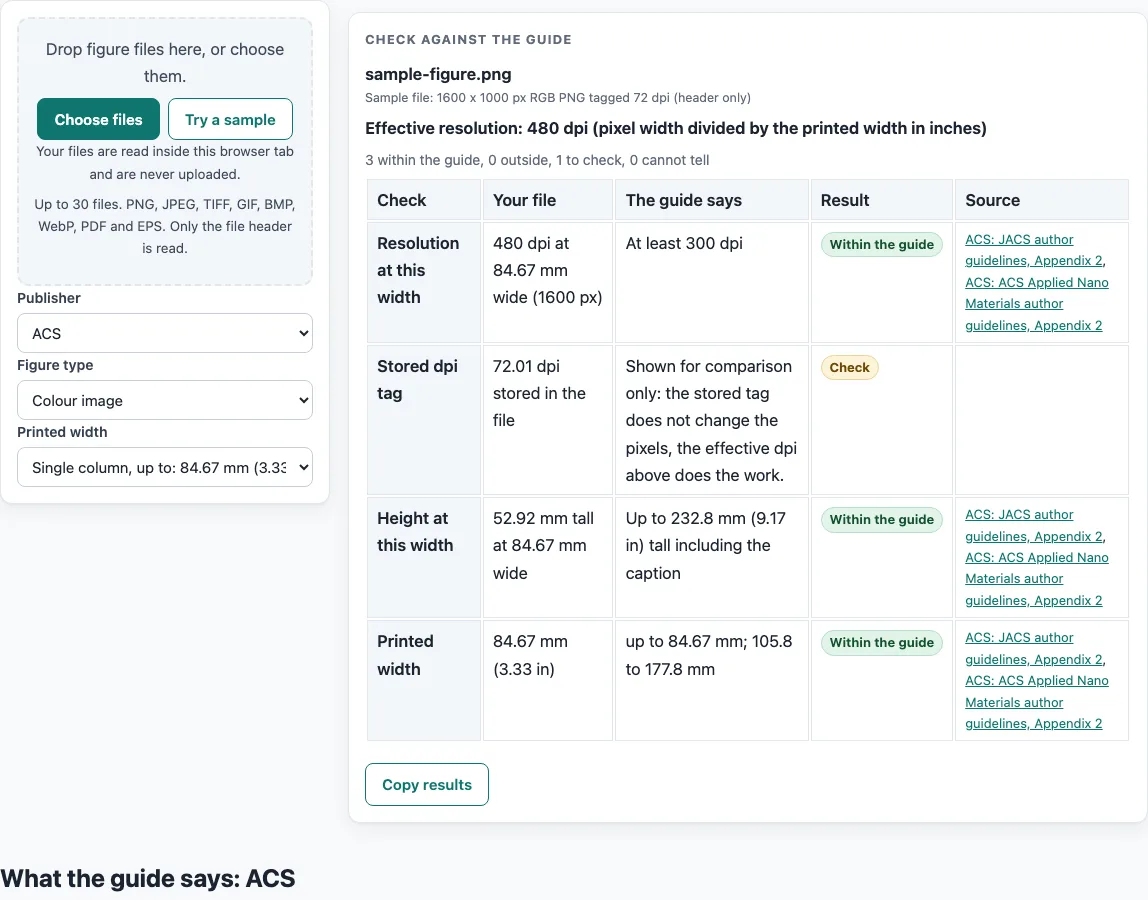
How to use the ACS figure requirements tool
- Decide which journal you are writing for. The numbers below are read for JACS and ACS Applied Nano Materials. For any other ACS journal, use that journal’s own guide.
- Identify your figure type: line art (black and white), grayscale image, or colour image.
- Measure the planned width of the figure. A single-column graphic is up to 84.67 mm (3.33 in) wide. A double-column graphic runs from 105.8 mm (4.17 in) up to 177.8 mm (7 in).
- Measure the height of the figure including its caption. It should be up to 232.8 mm (9.17 in) tall.
- Check the resolution. Line art needs at least 1200 dpi, grayscale images at least 600 dpi, and colour images at least 300 dpi.
- Check the lettering. It should be no smaller than 4.5 pt in the final published format. Helvetica or Arial work well.
- Check the line weight. Lines should be no thinner than 0.5 pt.
- Check the colour. Graphics meant to appear in black and white or grayscale should not be submitted in colour.
- Read each result against what the named guide says. Results are calculated from your inputs, so confirm any figure that matters against the journal’s current author guide.
The width, height and resolution numbers are for graphics pasted into manuscripts. The pages these numbers come from do not state a file format or file size, so the tool does not give results for those.
What are the ACS figure requirements for size?
ACS figure requirements set a width and height for each figure. A single-column graphic is up to 84.67 mm (3.33 in) wide, and a double-column graphic runs from 105.8 mm (4.17 in) up to 177.8 mm (7 in). A figure can be up to 232.8 mm (9.17 in) tall, measured including its caption.
The gap between single and double column is worth noting. A width between 84.67 mm and 105.8 mm does not match either range in the figures above, so plan your width to fit one of the two column sizes. The guide gives the same limits in points: 240 pt for a single column, 300 to 504 pt for a double column and 660 pt for the depth, which the tool converts to millimetres with 1 pt = 1/72 in. Single-column widths are stated in the guideline PDF as “up to 240 points wide (3.33 in.)”. A search snippet of another ACS file lists 3.25 in instead. The sources differ, so the tool uses the 240 point figure from the guideline PDF. If your figure sits close to that limit, check the current author guide.
What resolution and line settings do ACS figures need?
ACS figures need minimum resolutions that depend on the image type. Line art (black and white) needs at least 1200 dpi. Grayscale images need at least 600 dpi. Colour images need at least 300 dpi.
Line weight and lettering are set in points, not pixels. Lines should be no thinner than 0.5 pt. Lettering should be no smaller than 4.5 pt in the final published format, which means the size after the figure is scaled to its printed width. A figure that is reduced in size will shrink its lettering too, so measure the text at the final width rather than at the size it was drawn. Helvetica or Arial are the fonts named as working well.
Colour needs its own check. Graphics meant to appear in black and white or grayscale should not be submitted in colour. A figure that is in colour when it should be grayscale is outside the guide, even if its resolution is high.
The numbers above apply to JACS and ACS Applied Nano Materials, which carry the same text. Other ACS journals have their own guides, and their figures may need different values. Check the journal’s current author guide before you submit, because publisher specifications change.
Frequently asked questions
Does this tool upload my figure files?
No. Files are read inside your browser and are never uploaded.
Do I need to create an account to use it?
No sign-up is needed. The tool is free to use.
Which journals do these numbers cover?
The numbers are read for JACS and ACS Applied Nano Materials, which carry the same text. Other ACS journals have their own guides and may differ.
Why do the sources give different single-column widths?
The guideline PDF states single-column graphics as up to 240 points wide (3.33 in.). A search snippet of another ACS file lists 3.25 in. The tool uses the 240 point figure from the guideline PDF, and you should confirm the width in the current author guide.
Does the tool check file formats such as TIFF, PNG or PDF?
No. The pages these numbers come from state no file format or file size for graphics, so the results do not cover them.
Are these figure requirements the final word for submission?
No. Publisher specifications change. Use the results as a guide and check the journal’s current author guide before you submit.
What is the maximum height of an ACS figure?
The guide says a graphic can be up to 232.8 mm (9.17 in) tall, measured including its caption.
What are the lettering and line weight numbers?
The guide says lettering should be no smaller than 4.5 pt in the final published format and lines no thinner than 0.5 pt. Check them at the printed width of the figure.
Related tools
- Elsevier Figure Requirements: Use it when you are preparing figures for an Elsevier journal and need its own figure rules.
- Embed Fonts in PDF Checker: Use it when you need to check whether fonts are embedded in a PDF file.
- Journal Figure Size Calculator: Use it when you want to work out figure sizes for a journal’s column widths.
- IEEE Figure Requirements: Use it when your target is an IEEE publication and you need its figure rules.
- Journal Figure Checker: Use it when you want to compare a figure against a journal’s listed requirements.
- PLOS Figure Requirements: Use it when you are preparing figures for a PLOS journal.
- Springer Nature Figure Requirements: Use it when your figures are for a Springer Nature journal.
- Wiley Figure Requirements: Use it when you are preparing figures for a Wiley journal.