A2 poster size
A2 is 420 x 594 mm. Choose orientation and dpi to get the pixels, and enter your layout page width to see how text scales.
Recent
Your last 10 settings, saved only in this browser. Nothing is uploaded.
How to use the A2 poster size tool
- Choose “portrait” or “landscape”. The size stays A2 either way. Only the width and height swap.
- Enter the print resolution in dpi. The default is 150 dpi. Values from 10 to 2400 are accepted, and you will see a warning under 100 dpi or over 600 dpi.
- Enter the width of the layout page you draw on. The default is 13.33 in. The width must be greater than zero, and you can enter it in inches or cm. A layout page wider than the poster gives a scale under 1 and a warning.
- Enter the text size on that layout page in points. The default is 24 pt. Values from 1 to 1000 pt are accepted. Anything that is not a number is an error.
- Read the size in inches, cm and mm.
- Read the pixels needed at your dpi and the megapixels.
- Read the number of A4 sheets that fit, the area, and the aspect ratio.
- Read the nearest size in the other system, with the mm difference.
- Read the scale. If it is under 1, the layout page is wider than the poster.
- Read the printed text size. The board table only repeats what each event page published, so check the event’s current guide before you rely on it.
Presets are available for portrait at 150 dpi, landscape at 300 dpi, a 10 in layout page, a 25.4 cm layout page, and 18 pt on a 10 in page.
What does A2 poster size mean in mm and inches?
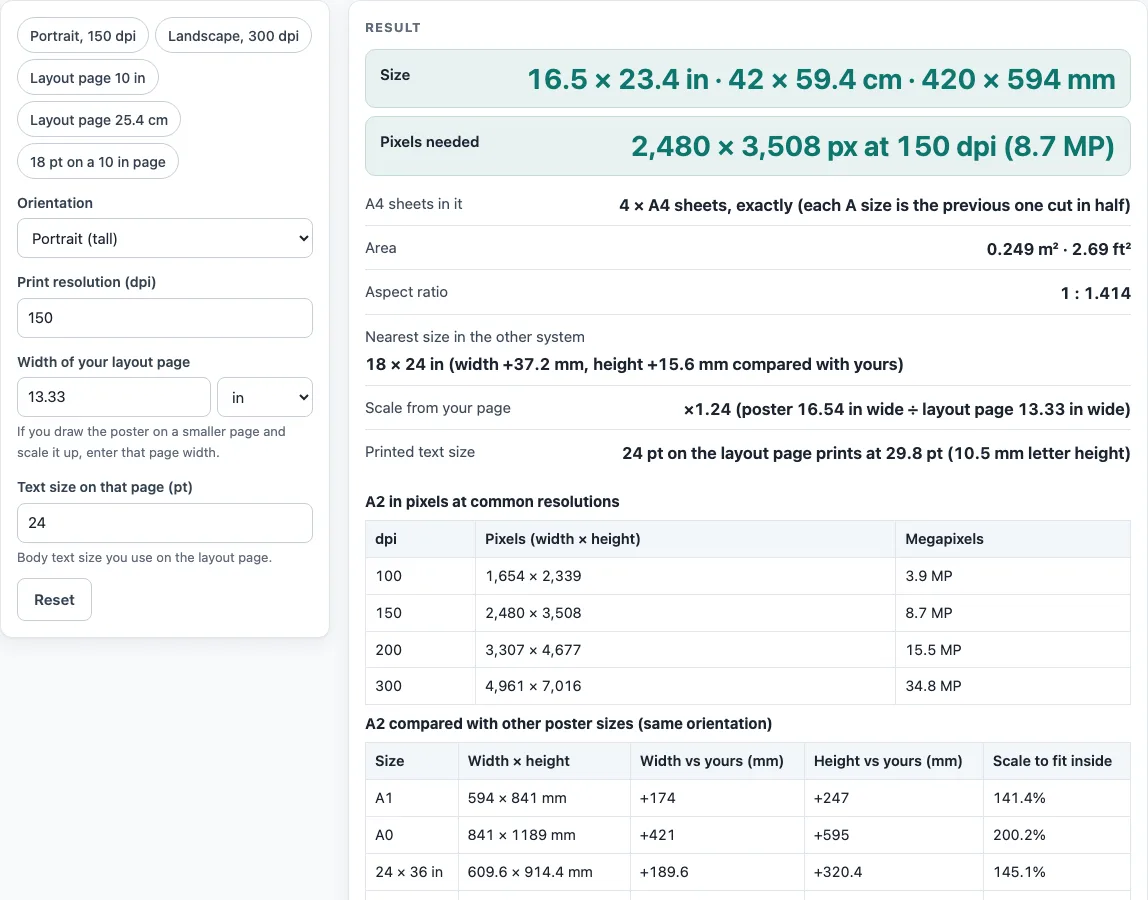
A2 is 420 x 594 mm, which equals about 16.5 x 23.4 inches. It is one of the ISO 216 paper sizes: A0 is 841 x 1189 mm, A1 is 594 x 841 mm, A2 is 420 x 594 mm, and A4 is 210 x 297 mm. Each size is the previous one cut in half. All ISO 216 sizes share the same ratio of 1 : 1.414.
Because of this, A2 is exactly four A4 sheets in area. Its area is 0.2495 m², or about 2.69 ft². Compared with A1, it is 174 mm narrower and 247 mm shorter. Some poster sizes that use inches are close to A-sizes but not equal to them. The comparison table on this page shows the difference in mm for A0, A1, A2, 24x36, 30x40, 36x48 and 42x42 in. For example, A0 is not a 36 x 48 in poster: 36 x 48 in is 73.4 mm wider and 30.2 mm taller than A0, and the table shows those gaps.
How are scale, pixels and printed text size worked out?
Pixels equal the size in inches multiplied by the dpi, rounded to whole pixels. At 150 dpi, A2 is 2,480 x 3,508 px. At 300 dpi, it is 4,961 x 7,016 px. The table on this page also shows 100 dpi (1,654 x 2,339 px) and 200 dpi (3,307 x 4,677 px). Higher dpi means more pixels, but the page does not say which dpi a given journal or event requires.
Scale is the poster width divided by the layout page width. A worked example uses A2 on a 10 in wide layout page. The scale is 1.65. A 24 pt text size on that page prints at 39.7 pt. To find the letter height in mm, divide the points by 72 and multiply by 25.4, because 1 in = 25.4 mm exactly.
The board table checks A2 against nine rules from public conference pages, such as Berkeley CTML (42 x 42 in maximum, 30 x 40 in recommended), IEEE (36 in high x 48 in wide) and ISSBD (90 x 150 cm recommended). The sources do not always agree. ICPRP/IIUM (95 x 120 cm, up to 150 cm high) and ISSBD are both portrait but differ, so both are shown side by side. The results show what each named guide says, not whether your poster is right for an event. Check the current guide of your event or journal before you submit, because specifications change. The HFES sheet also writes 42 in as “106.68 cm” once and “160.68 cm” elsewhere, and the tool uses 42 in only.
Worked examples
| Input | Result |
|---|---|
| portrait, 150 dpi, layout page 13.33 in wide | 2,480 × 3,508 px; text scale ×1.24 |
| landscape, 300 dpi, layout page 13.33 in wide | 7,016 × 4,961 px; text scale ×1.75 |
| portrait, 150 dpi, layout page 10 in wide | 2,480 × 3,508 px; text scale ×1.65 |
Calculated by the tool above; open it with the same values to see each step.
Frequently asked questions
Is A2 the same as a 24 x 36 inch poster?
No. A2 is 420 x 594 mm, while 24 x 36 in is 609.6 x 914.4 mm. The comparison table on this page shows the exact width and height differences for each size.
How many A4 sheets fit on an A2 poster?
Exactly four. The tool reports this count, and it matches the fact that A2 is four times the area of A4.
Which dpi should I enter?
The tool accepts any value from 10 to 2400 dpi and shows pixel counts at 100, 150, 200 and 300 dpi. It warns you below 100 dpi and above 600 dpi. It does not say which dpi is right for your use.
Why does my scale show a value under 1?
The scale is the poster width divided by the layout page width. A scale under 1 means your layout page is wider than the poster, so the text will print smaller than the size you entered.
Do conference guides agree on maximum poster sizes?
No. Berkeley CTML allows up to 42 x 42 in, the HFES board space is 42 x 42 in, and the postpartum page allows 48 x 48 in. The tool lists each source as published.
Are my files uploaded when I use this tool?
No. Files are read inside your browser and are never uploaded. No sign-up is needed.
Related tools
- 36x48 poster: use it to compare a 36 x 48 in poster with A2, since the two sizes differ in both directions.
- A0 poster size: use it when you need the size of the next ISO size up from A2.
- A1 poster size: use it when you want a larger ISO size that is exactly two A2 sheets in area.
- Conference poster size: use it to compare sizes that conference pages publish.
- Poster dimensions: use it to look up dimensions for a poster in different units.
- Poster Font Size Calculator: use it to work out text sizes for a layout page of a chosen width.
- Research poster template: use it when you want a layout to start from.
- Scientific poster size: use it to compare sizes used for scientific posters.