A0 poster size
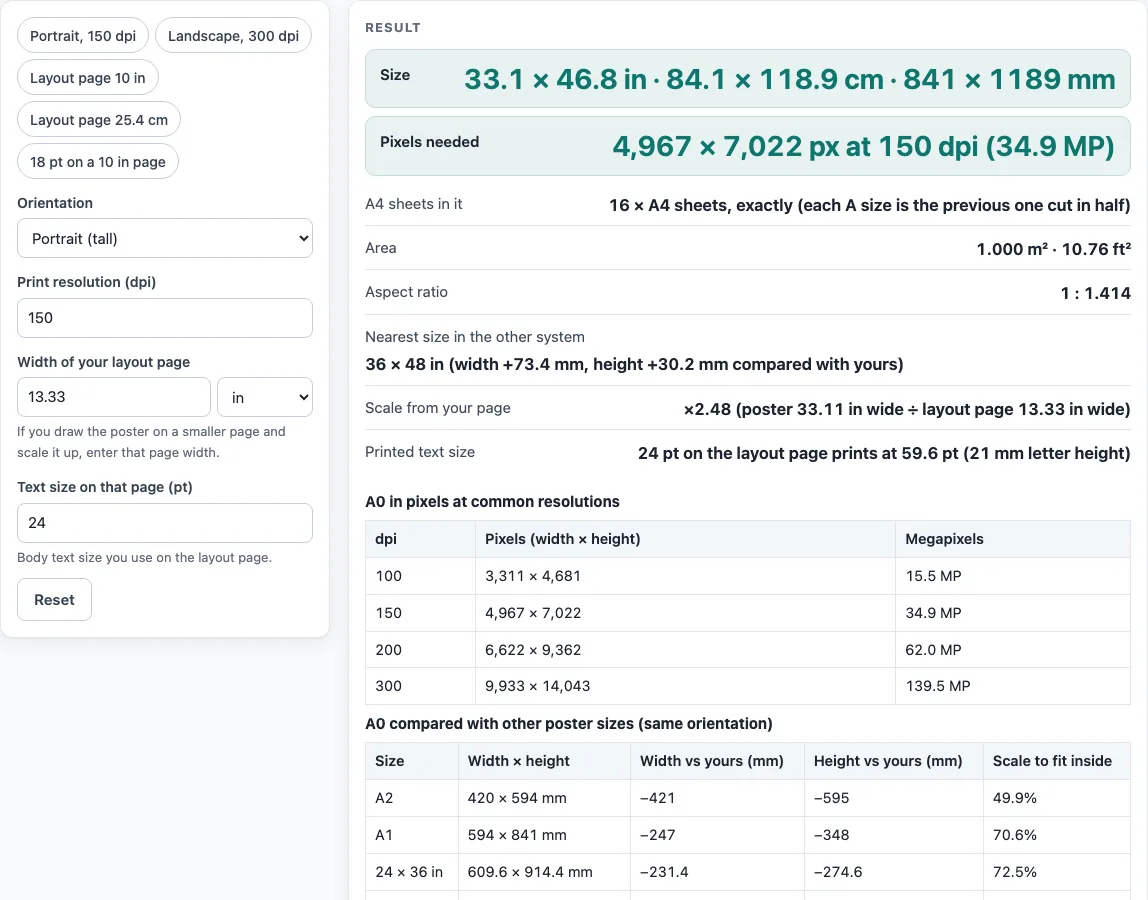
A0 is 841 x 1189 mm. Choose orientation and dpi to get the pixels, and enter your layout page width to see how text scales.
Recent
Your last 10 settings, saved only in this browser. Nothing is uploaded.
How to use the A0 poster size tool
- Choose the orientation, portrait or landscape. The size stays A0 at 841 x 1189 mm either way. Landscape swaps the width and height in the results.
- Set the print resolution in dpi. The default is 150 dpi. Values from 10 to 2400 dpi are accepted. Values under 100 or over 600 show a warning.
- Enter the width of your layout page, the smaller page you draw on. The default is 13.33 in. A width of zero or less is an error. A layout page wider than the poster gives a scale under 1, which is shown as a warning.
- Enter the text size on the layout page in points. The default is 24 pt. Sizes from 1 to 1000 pt are accepted. Anything outside that range is an error, as is any entry that is not a number.
- Read the results: size in inches, cm and mm; pixels needed with megapixels; the A4 sheet count; area; aspect ratio; the nearest size in the other system with the mm difference; the scale from your layout page; and the printed text size.
- Compare the pixel count with the second table, which shows pixels at 100, 150, 200 and 300 dpi.
The presets give you starting points: portrait 150 dpi, landscape 300 dpi, a layout page 10 in wide, a layout page 25.4 cm wide, and 18 pt text on a 10 in page. Choose a preset, then change any value to match your own layout. The results update from the numbers you enter, and the A0 size itself does not change.
What are the A0 dimensions in inches and millimetres?
A0 measures 841 x 1189 mm, which is 33.11 x 46.81 in. The inch figures come from the exact rule 1 in = 25.4 mm (NIST SP 811), so each inch value is the millimetre value divided by 25.4.
A0 is part of the ISO 216 series, with a ratio of 1 : 1.414. A1 is 594 x 841 mm, A2 is 420 x 594 mm and A4 is 210 x 297 mm. Each size is the previous one cut in half, and A0 itself has an area of one square meter.
How many A4 sheets fit on an A0 poster?
Exactly 16 A4 sheets fit on A0, 8 fit on A1 and 4 fit on A2, because each ISO step is half the area of the one before. The area of A0 is 0.99995 m2, shown as 1.000 m2. For sizes outside the ISO series, the tool counts by area alone, so that figure does not show how sheets would be laid out.
How many pixels does an A0 poster need at a given dpi?
Pixels equal inches multiplied by dpi, rounded to the nearest whole pixel. At 150 dpi, A0 is 4,967 x 7,022 px. At 100 dpi it is 3,311 x 4,681, at 200 dpi 6,622 x 9,362, and at 300 dpi 9,933 x 14,043. Landscape swaps the width and height.
How do scale and printed text size work?
Scale equals the poster width divided by the layout page width, using the same unit for both. A0 is 33.11 in wide, so on a 10 in wide layout page the scale is 3.311. A text size in points on the page is multiplied by the scale. For example, 24 pt text becomes 79.5 pt (24 x 3.311). To convert points to millimetres, divide by 72 and multiply by 25.4.
Why do poster size guidelines differ between events?
The page does not say that any size is right for an event. The board table lists nine rules as published on public conference pages, and some of them disagree. Berkeley CTML recommends 30 x 40 in but allows up to 42 x 42 in, while the HFES board space is 42 x 42 in. The IEEE and MiALA rules describe 36 tall by 48 wide, while the “36x48 poster” keyword is used for both 36 x 48 and 48 x 36. ICPRP/IIUM’s 95 x 120 cm and ISSBD’s 90 x 150 cm are both portrait but differ. These are shown side by side, not averaged. Event rules change, so read the current guide for your own event. The HFES sheet also gives 42 in as “106.68 cm” in one place and “160.68 cm” in another. The tool uses 42 in only.
Worked examples
| Input | Result |
|---|---|
| portrait, 150 dpi, layout page 13.33 in wide | 4,967 × 7,022 px; text scale ×2.48 |
| landscape, 300 dpi, layout page 13.33 in wide | 14,043 × 9,933 px; text scale ×3.51 |
| portrait, 150 dpi, layout page 10 in wide | 4,967 × 7,022 px; text scale ×3.31 |
Calculated by the tool above; open it with the same values to see each step.
Frequently asked questions
Is the a0 poster size the same as 36 x 48 in?
No. A0 is 841 x 1189 mm, while 36 x 48 in is 914.4 x 1219.2 mm. Compared with 36 x 48 in, A0 is 73.4 mm narrower and 30.2 mm shorter.
What resolution should I use for an A0 poster?
The tool starts at 150 dpi and shows pixel counts at 100, 150, 200 and 300 dpi. Which resolution you need depends on the journal or event, so check the current author guide.
Does the tool check whether my poster meets event rules?
No. The results are calculated from your inputs. The board table repeats what each event page published, and the page does not say that any size is right for an event.
Why does the tool show a warning?
Warnings appear for dpi under 100 or over 600, and when the layout page is wider than the poster, which gives a scale under 1. Errors appear for a non-number, a page width of zero or less, dpi outside 10 to 2400, or a text size outside 1 to 1000 pt.
Does landscape A0 have a different area from portrait A0?
No. Landscape has the same area and ratio, with width and height swapped. At 150 dpi, landscape A0 is 7,022 x 4,967 px, instead of 4,967 x 7,022 px in portrait.
Are my files uploaded when I use this tool?
No. Files are read inside your browser and never uploaded. The tool is free and does not require a sign-up.
Related tools
- 36x48 poster: Use it to compare a 36 x 48 in layout with A0 and see the mm differences.
- A1 poster size: Use it when you need the next size down in the ISO series.
- A2 poster size: Use it when you are working with a smaller ISO poster.
- Conference poster size: Use it to compare the sizes that different conference pages publish.
- Poster dimensions: Use it to check the width and height of a poster in different units.
- Poster Font Size Calculator: Use it to work out the printed size of text on a poster.
- Research poster template: Use it to set up a layout page before you enter its width here.
- Scientific poster size: Use it to look up the size options commonly used for scientific posters.